
Less than 1% of searchers reach Google's second page, while the top result gets 27.6% of all clicks according to Macrometa's ecommerce SEO audit overview. That changes how you should think about an ecommerce SEO audit.
This isn't a housekeeping exercise. It's a revenue defense and growth process. On a large catalog, a few technical mistakes can bury entire product ranges, waste crawl budget on faceted URLs, and leave your best commercial pages invisible for the queries that convert.
After auditing ecommerce sites across fashion, SaaS-adjacent marketplaces, home goods, and DTC brands, the pattern is consistent. Teams lose time chasing long issue lists with no prioritization. The stores that win don't fix everything at once. They fix the issues that block crawling, indexing, ranking, and conversion first.
Table of Contents
- Why Your Ecommerce SEO Audit Is Mission-Critical
- Pre-Audit Prep Your Essential Tools and Configuration
- The Technical SEO Health Check Crawl Index and Speed
- On-Page Optimization for Product and Category Pages
- Auditing Site Architecture and Content Ecosystem
- Analyzing Your Backlink Profile and Competitive Landscape
- Building Your Actionable Remediation Roadmap
Why Your Ecommerce SEO Audit Is Mission-Critical
An ecommerce SEO audit matters because ranking gaps are rarely isolated. One indexing error can suppress a category. One canonical mistake can dilute variant pages. One bloated JavaScript stack can weaken every product page at once.
Most stores don't have a content problem first. They have a prioritization problem. Teams spend weeks rewriting titles while Google still struggles to crawl parameter-heavy URLs, understand canonicals, or index the pages that generate margin.
That matters more in ecommerce because the site structure is bigger, the templates are repeated, and the stakes are tied to commercial intent. If a blog post underperforms, you lose some awareness. If your core category pages underperform, you lose purchase-ready traffic.
Practical rule: Treat the audit as a profit triage system. Ask which issues stop search engines from reaching, trusting, or ranking the pages that sell.
The wrong way to run an audit is to export hundreds of issues from a tool and label them all “high priority.” That creates noise, not progress. A useful audit tells you what to fix now, what to schedule next, and what to ignore until the foundations are stable.
Three realities shape every serious ecommerce SEO audit:
- Clicks concentrate at the top: If your pages aren't on page one, organic demand is effectively going elsewhere.
- Catalog scale magnifies errors: Template problems repeat across hundreds or thousands of URLs.
- Revenue comes from qualified sessions: More traffic only matters if product discovery, merchandising, and page experience support conversion.
A good audit produces decisions, not just diagnostics. It should help a marketer defend priorities, help a developer understand why a fix matters, and help leadership connect SEO work to commercial outcomes.
Pre-Audit Prep Your Essential Tools and Configuration
Start with a tool stack that lets you see the site the way Google sees it, then layer in business data so you can connect technical problems to money pages.
The minimum useful stack is simple: Screaming Frog, Google Search Console, Google Analytics, and one competitive platform such as Ahrefs or Semrush. You can audit with more, but you shouldn't start with less.

Build a crawl setup that reflects reality
A rigorous ecommerce SEO audit needs a three-tiered technical crawl strategy using Screaming Frog with the "Googlebot (Smartphone)" user-agent plus Google Analytics and Search Console integrations according to Duda's ecommerce SEO audit checklist. If you skip that setup, you're often auditing a desktop version of the site that Google no longer prioritizes.
I usually run three separate crawls:
- A full crawl of the live site to detect crawl depth, canonicals, indexability signals, redirects, parameter URLs, and thin template patterns.
- A segmented crawl of priority directories like key categories, product families, and brand pages where revenue concentration is highest.
- A validation crawl after fixes so the team can confirm what changed before rollout assumptions turn into false confidence.
What matters isn't just the crawl. It's the configuration.
- User-agent setting: Use Googlebot Smartphone, not the default.
- Rendering choice: Use JavaScript rendering selectively on templates that depend on client-side content.
- Canonical extraction: Make sure the crawl captures canonical targets and status codes.
- Custom extraction: Pull schema presence, review blocks, stock status, and key template elements if they matter to merchandising or SERP appearance.
Pull the right supporting data before you crawl
Raw crawler data can tell you what's broken. It can't tell you what matters most without context.
Connect the APIs before you start so you can enrich URL-level findings with performance and indexation signals. That helps you answer better questions:
- Which excluded URLs still generate sessions?
- Which product pages have impressions but weak click behavior?
- Which important URLs are orphaned from internal navigation?
- Which parameter URLs are consuming crawl paths without ranking value?
Don't audit a 50,000-URL store like every URL deserves equal attention. Pull revenue, sessions, and organic landing page data first, then sort findings against the pages that actually matter.
Also export a clean list of priority pages before the audit begins. Include top categories, best-selling products, brand pages, seasonal collections, and newly launched commercial pages. When the issue list gets long, that shortlist keeps the team anchored to business impact.
The Technical SEO Health Check Crawl Index and Speed
Technical SEO is where most ecommerce audits either create immediate gains or disappear into trivia. If Google can't crawl key paths, index the right URLs, or load pages fast enough on mobile, everything else becomes secondary.
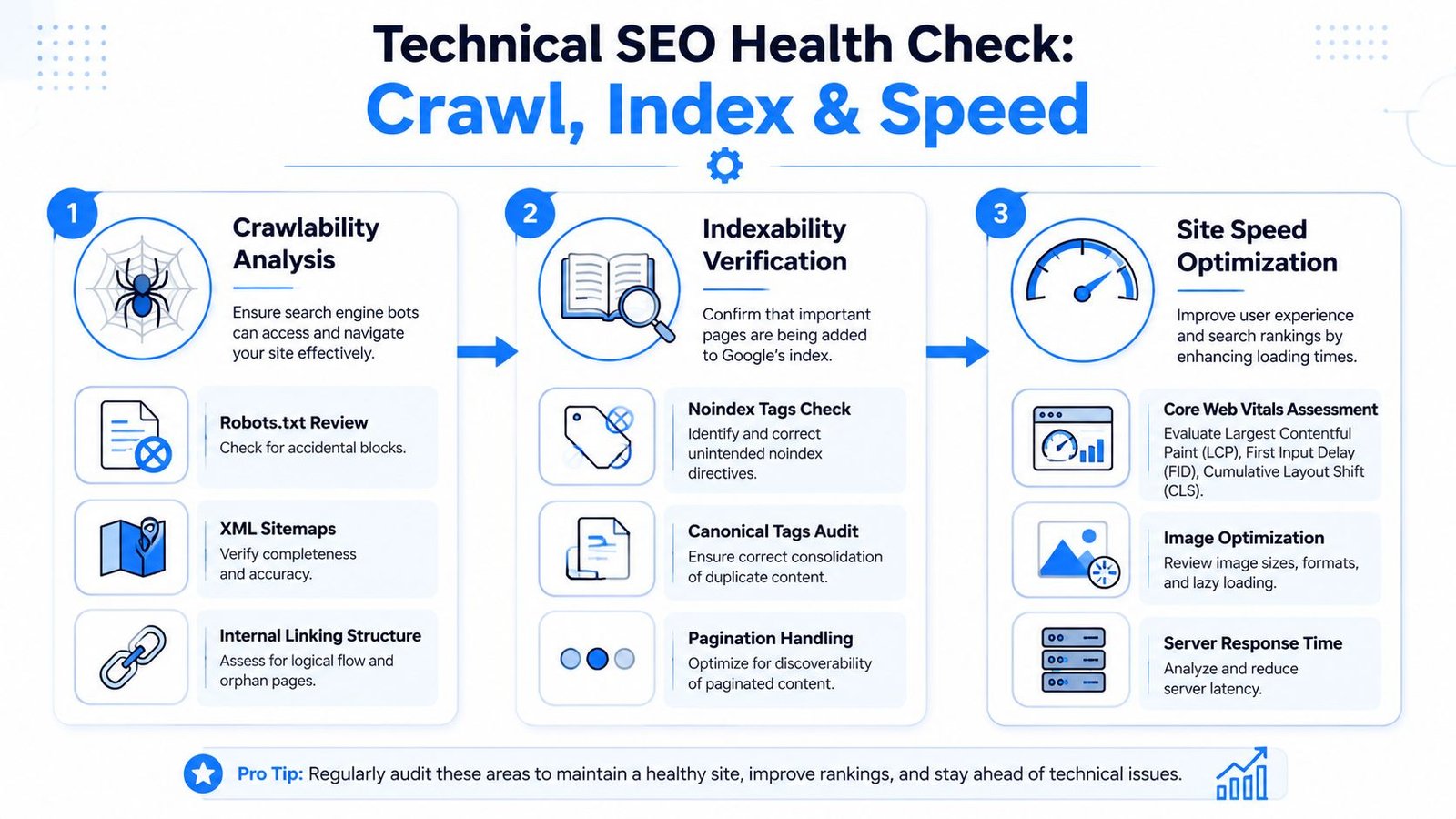
The fastest wins usually come from triage. I sort findings into crawlability, indexability, and performance, then fix the blockers in that order.
Crawlability comes first
If bots waste time crawling filters, session parameters, or duplicate URL patterns, the site leaks attention before Google reaches the pages you care about.
Check these first:
- Robots directives: Review robots.txt for accidental blocks on categories, product folders, media assets, or staging leftovers.
- XML sitemap hygiene: Make sure sitemaps only include canonical, indexable URLs that deserve ranking.
- Parameter sprawl: Identify filtered, sorted, paginated, and internal-search URLs that create crawl waste.
- Internal discovery paths: Confirm important products and categories are linked from crawlable pages, not only surfaced by search or JavaScript interactions.
The biggest technical mistakes on ecommerce sites are usually structural, not exotic. Faceted navigation creates endless combinations. Platform defaults generate duplicate collection paths. Merchandising tools add temporary URLs that never get cleaned up.
Indexability is where silent losses happen
A page can be crawlable and still fail to earn organic visibility if its indexation signals conflict.
Look for conflicts such as:
| Check | What to verify | Why it matters |
|---|---|---|
| Canonical tags | Canonical points to the correct live URL | Bad canonicals can consolidate away ranking signals |
| Meta robots | Important pages aren't noindexed by mistake | One template change can remove whole sections from search |
| Redirect chains | Internal links don't point through old redirects | Chains waste crawl paths and weaken consistency |
| Duplicate templates | Variants and collections aren't competing unnecessarily | Duplication muddies relevance and indexing signals |
A serious ecommerce SEO audit also needs to verify self-referencing canonicals on indexable pages, especially when variants, parameters, and collection paths create multiple URL versions. In practice, many category and product visibility problems often emerge from these conditions.
If a product exists in the catalog but points its canonical elsewhere, Google may treat it as supporting clutter instead of a ranking asset.
Speed is not a vanity metric
Once crawl and index fundamentals are stable, test page speed on the templates that drive organic revenue. Don't obsess over a homepage score while product pages struggle under image weight, third-party scripts, and client-side rendering.
Audit speed at the template level:
- Category pages: layered navigation, image grids, sorting controls
- Product pages: gallery scripts, reviews widgets, recommendations, stock modules
- Mobile view: the version Google evaluates first
Core Web Vitals belong here because they affect usability and ranking resilience. For a deeper implementation view, this guide on Core Web Vitals optimization is a useful technical companion.
The practical fix list is rarely glamorous. Compress and properly serve product images. Remove dead apps and scripts. Reduce layout shifts from review widgets and promo bars. Make sure critical product content appears without relying on delayed rendering. Those changes tend to outperform cosmetic SEO tweaks because they improve the pages users and bots both depend on.
On-Page Optimization for Product and Category Pages
On-page auditing for ecommerce isn't about sprinkling keywords into templates. It's about checking whether each money page sends a clear relevance signal and helps a shopper move toward purchase.
I audit product and category pages differently because they do different jobs. Product pages close demand. Category pages organize and capture it.
Product pages should answer buying questions
A product page that only repeats manufacturer copy rarely performs well. It doesn't differentiate the offer, doesn't help search engines understand context, and doesn't reduce purchase hesitation.
When reviewing product pages, I look for this combination:
- Search alignment: The title tag, H1, body copy, image alt text, and structured data all describe the same product clearly.
- Originality: The page isn't just syndicated supplier text with minor edits.
- Decision support: Specs, sizing, compatibility, shipping details, returns, and FAQs are easy to find.
- Trust signals: Reviews, policies, and merchant reassurance are visible without cluttering the layout.
Weak product pages usually fail in one of two ways. They either have too little information, or they front-load SEO copy and bury the details shoppers need. Both hurt performance.
A practical review method is to compare top organic product pages against lower-performing ones in the same catalog. The stronger pages usually do a better job with specificity. They show what the item is, who it's for, what problem it solves, and how it differs from adjacent products.
Category pages should guide choice not just list products
Category pages often carry more ranking potential than individual products because they map to broader commercial intent. But many stores treat them as simple product grids with a thin paragraph added for SEO.
That doesn't hold up in competitive markets.
A strong category page needs editorial structure without disrupting shopping flow. I usually audit these elements together:
| Element | What good looks like | What usually fails |
|---|---|---|
| Title and meta description | Clear intent match and compelling search snippet | Boilerplate text repeated across collections |
| Intro copy | Useful orientation, not filler | Generic copy stuffed with product names |
| Facet behavior | Helps users refine without creating chaos | Indexable filter combinations with no unique value |
| Internal linking | Points to subcategories, guides, brands | No contextual paths beyond menu navigation |
The best category pages also reflect how people shop. They compare options, expose relevant subtypes, and surface buying criteria naturally. For example, a category for office chairs should help a shopper narrow by ergonomic need, material, or use case without generating endless low-value URLs.
A category page should feel like a smart store associate. It should narrow choices, reduce friction, and still be easy for Google to interpret.
One more point that gets missed in audits: CTR matters at the page level, even when rankings are decent. If a category has impressions but weak clicks, rewrite the title and meta description based on intent, not template convention. “Men's Running Shoes” is a label. “Men's Running Shoes for Road, Trail, and Daily Training” is a clearer promise.
Auditing Site Architecture and Content Ecosystem
Large ecommerce sites don't rank because they have lots of pages. They rank because the relationship between those pages is logical.
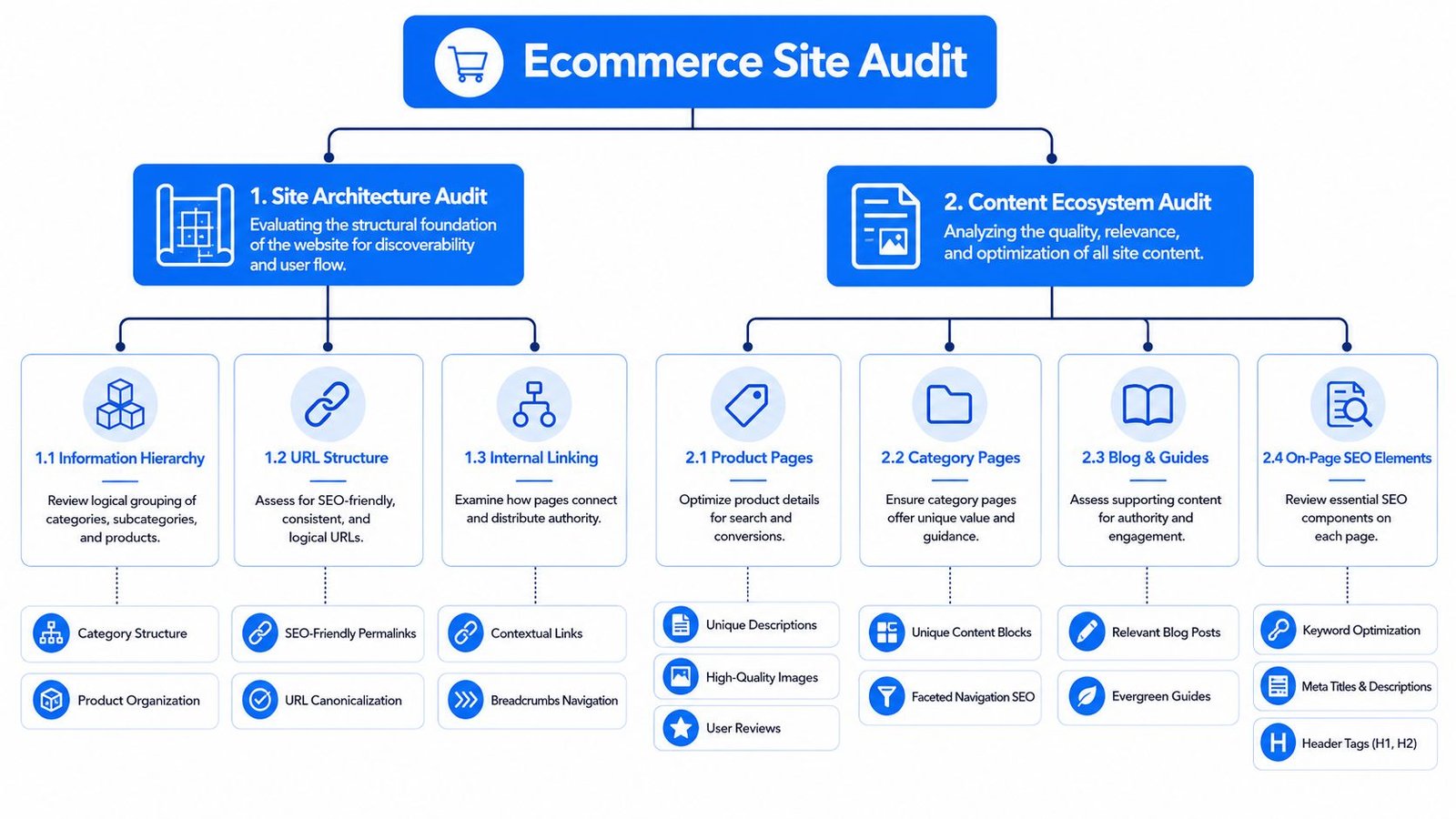
The audit here is less about isolated URLs and more about whether the entire site helps Google understand hierarchy, intent, and importance. That means reviewing faceted navigation, click depth, internal linking, schema, and supporting content as one system.
Architecture problems usually start with faceted navigation
Facets are useful for users and dangerous for SEO when left unmanaged. Filters for size, color, material, price, and availability can generate huge numbers of URLs that offer little standalone value.
I audit architecture by asking three questions:
- Which filtered URLs deserve indexation because they map to real search demand?
- Which combinations should remain crawl-controlled or canonicalized?
- Which important commercial pages are buried too deep in the structure?
A useful benchmark comes from Odin Digital's ecommerce SEO audit checklist, which notes that sites ignoring thin content audits and failing to keep pages within four clicks from the homepage suffer a 35% higher rate of orphan page coverage errors in Google Search Console. That benchmark is practical because click depth on ecommerce sites often reveals hidden merchandising and SEO failures at the same time.
For architecture planning, this guide to site structure for SEO is worth reviewing alongside your crawl data.
When product launches underperform, the cause is often boring. The page exists, but it sits too deep, has no contextual links, and relies on internal search or seasonal modules to be discovered. That's an architecture issue, not a copy issue.
Schema and supporting content should reinforce the commercial structure
Schema isn't a magic lever, but it helps search engines interpret what each page is and how pages relate to one another. On ecommerce sites, I check Product, BreadcrumbList, and FAQ-related schema where appropriate, then validate whether the structured data matches the visible page content.
A few common failures show up repeatedly:
- Product schema that doesn't match the actual variant shown
- Breadcrumb markup that conflicts with the preferred URL path
- FAQ markup attached to weak or hidden content
- Missing schema on major templates while low-value pages are over-marked
The content ecosystem matters just as much. Supporting guides, comparison pages, care instructions, and use-case content can build internal authority toward categories and products if they're mapped intentionally.
Here's where many teams go wrong. They publish blog content on broad topics that never link meaningfully into commercial pages. A useful content ecosystem does the opposite. It answers pre-purchase questions and pushes qualified users deeper into the catalog.
Good architecture creates ranking paths. Good supporting content strengthens those paths.
When auditing this area, I don't ask whether the site has a blog. I ask whether the site's information architecture and content model make commercial pages easier to discover, understand, and trust.
Analyzing Your Backlink Profile and Competitive Landscape
Backlink analysis is less about counting links and more about understanding authority patterns in your market.
For ecommerce brands, I use this part of the audit as competitive intelligence. Your own profile tells you where risk and weakness sit. Competitor profiles tell you what authority signals tend to support rankings in the category.
Audit your own backlink profile without overreacting
Start by reviewing linking root domains, anchor text patterns, top linked pages, and obvious quality issues. Most brands don't need a dramatic cleanup. They need judgment.
I look for signs such as:
- Manipulative anchor concentration: Too many keyword-heavy anchors pointing to commercial pages.
- Low-value sitewide links: Widgets, footers, or syndicated placements that add noise.
- Link imbalance: Most links point to the homepage while categories and linkable assets get nothing.
- Legacy campaign residue: Old agency placements that no longer fit the site or brand.
The disavow tool should be used cautiously. If the link profile shows clear patterns of harmful legacy acquisition, document them and act carefully. If the profile is just messy, focus first on building stronger links that dilute weaker ones over time.
If your team needs a quick grounding, this explainer on what a backlink is gives the baseline language most non-SEO stakeholders need before reviewing link data.
Use competitors as a link prospecting map
The better use of backlink auditing is offensive. Pull the top organic competitors for your most valuable categories, then review the pages and link types that support their visibility.
I pay attention to:
| Competitive signal | What to look for | Why it matters |
|---|---|---|
| Linked content formats | Buying guides, comparisons, data pages, brand stories | Reveals what earns links in the niche |
| Category-level links | Editorial references to collection pages | Shows whether commercial pages can attract authority directly |
| Repeating referring domains | Publications or partners linking to multiple competitors | Strong outreach shortlist |
| Brand mention gaps | Sites covering peers but not your store | Usually faster to pitch than cold link campaigns |
This changes the audit from cleanup to roadmap. Instead of saying “we need more links,” you can say “competitors earn links from gift guides, manufacturer roundups, niche publications, and comparison content, while our profile is concentrated on the homepage.”
That creates an actionable next step. Build the assets that fit the market, then pursue the domains already proving they link in your category.
Building Your Actionable Remediation Roadmap
An audit only becomes valuable when it turns into a sequence of work people can execute. That means replacing the giant spreadsheet of problems with a prioritized roadmap.
The simplest system is an impact/effort matrix. Each issue gets scored for likely business impact and implementation effort. That forces discipline. It also stops teams from spending a sprint on low-value cleanup while indexation problems remain open.
A useful benchmark from SEOmator's statistical breakdown of SEO audits says that sites conducting quarterly SEO audits achieve up to 61% more organic traffic, 32% higher conversion rates, and 50% lower bounce rates compared to sites that don't audit regularly. The reason that matters here is not the audit itself. It's the repeated prioritization and execution that follow it.
Use an impact effort matrix not a flat checklist
I score issues on a five-point scale.
- Impact 5: Likely to affect major category visibility, core product discovery, or organic conversion performance.
- Impact 3: Helpful improvement, but not a structural blocker.
- Impact 1: Nice to have, low direct effect.
Effort works the same way.
- Effort 5: Requires template changes, engineering support, QA, and rollout coordination.
- Effort 3: Moderate implementation across key templates or content sets.
- Effort 1: Fast edits, rule changes, or straightforward publishing work.
Then sort issues into four groups:
High impact, low effort
Fix these first. Examples include incorrect noindex directives, broken canonicals on priority templates, sitemap cleanup, or internal links missing from key category hubs.High impact, high effort
Plan these as projects. Think faceted navigation controls, template refactoring, script reduction, or category architecture redesign.Low impact, low effort
Batch these when resources allow. They matter, but they shouldn't outrank structural fixes.Low impact, high effort
Usually postpone. If the commercial upside isn't clear, don't let them consume the roadmap.
The best roadmap answers two questions for every task: what happens if we fix this, and what happens if we leave it alone?
Sample SEO remediation roadmap
| Task/Issue | Priority | Impact (1-5) | Effort (1-5) | Owner | Status |
|---|---|---|---|---|---|
| Remove accidental noindex from key category templates | Critical | 5 | 2 | SEO + Dev | Not started |
| Correct canonical logic on product variants | Critical | 5 | 3 | Dev | In progress |
| Exclude low-value parameter URLs from crawl pathways | High | 5 | 4 | SEO + Dev | Not started |
| Improve internal links to new collection pages | High | 4 | 2 | SEO + Content | Planned |
| Rewrite weak category metadata for core commercial pages | Medium | 3 | 2 | SEO | In progress |
| Consolidate thin duplicate product copy on priority SKUs | Medium | 3 | 3 | Content | Planned |
A good roadmap also assigns review dates. Ecommerce sites change constantly. Merchandising adds pages, developers ship features, and inventory shifts. If you don't revisit the roadmap quarterly, fixes decay and new problems replace the old ones.
If your team wants help turning audit findings into a link acquisition and execution plan, SaasSky works with SaaS and ecommerce brands that care about transparent process, accountable delivery, and SEO work tied to measurable business outcomes.