Most advice about Pinterest backlinks gets the sequence wrong. It tells teams to make prettier Pins, post more often, and hope traffic follows. That's incomplete.
For SaaS and eCommerce, backlinks from Pinterest work when you treat Pinterest as a search layer with link behavior, metadata, and distribution rules of its own. The value doesn't come from random social activity. It comes from building assets that can rank, get repinned, and send clean attribution back to source pages that are worth linking to in the first place.
That distinction matters if you're responsible for pipeline, revenue, or CAC, not vanity engagement. A Pinterest program can become a repeatable backlink engine, but only if the setup, asset design, board structure, and tracking model are built for SEO outcomes.
Table of Contents
- Why Pinterest Is Your Untapped Backlink Goldmine
- Laying the Technical Foundation for Link Equity
- Designing Assets That Beg to Be Repinned
- The SEO-Driven Pinning and Distribution Workflow
- Advanced Tactics and Technical Link Considerations
- Tracking Attribution and Proving ROI
Why Pinterest Is Your Untapped Backlink Goldmine
Pinterest gets dismissed by B2B teams because it looks like a consumer platform. That's a category error. For link builders, Pinterest behaves less like a social feed and more like a visual search engine that keeps surfacing content long after publish day.
That matters because the platform sits on a Domain Authority of 94, and most Pinterest links begin as nofollow but can shift into do-follow backlinks when a Pin gains traction and ranks in the top 10 for a keyword, a mechanism introduced in May 2023 according to this breakdown of Pinterest backlink behavior. If you're evaluating what is a backlink in practical terms, Pinterest then becomes more than a traffic assist and starts behaving like an SEO asset. For a quick refresher on the basic definition, see SaasSky's guide to what a backlink is.
A lot of marketers stop at "Pinterest links are nofollow," then move on. That's outdated thinking. The better question is whether your content can earn enough search visibility and engagement on Pinterest to trigger stronger SEO value.
Pinterest rewards systems, not one-off posts
The teams that get results from backlinks from Pinterest don't treat it as a side channel run by an intern. They build a repeatable loop:
- Publish link-worthy destination pages that deserve traffic and citations
- Create multiple visual entry points for the same page
- Target searchable topics rather than internal campaign language
- Distribute through boards that reinforce topic relevance
That loop fits SaaS and eCommerce better than it might seem. SaaS brands can pin templates, comparison visuals, workflow diagrams, onboarding checklists, and product education assets. eCommerce brands can pin buying guides, use-case collections, routine boards, and product-led tutorials.
Practical rule: If a page wouldn't earn links or conversions without Pinterest, Pinterest won't rescue it.
The platform's advantage is asymmetry
Google link building is crowded. Pinterest isn't. Most competitors still treat it as a lifestyle channel, which leaves room for operators who understand search intent, metadata, and distribution.
The opportunity isn't that every Pin becomes an SEO win. It won't. The opportunity is that a well-structured Pinterest program can keep producing discoverable assets tied to the same commercial pages, with upside that compounds when the right Pins rank and spread. That's the kind of asymmetry growth teams should pay attention to.
Laying the Technical Foundation for Link Equity
A Pinterest strategy becomes ineffective when the account is set up like a social profile instead of a publishing system. Before you design a single Pin, fix the plumbing.

For SEO teams, this stage is the difference between scattered attribution and clean link paths. It's the Pinterest equivalent of getting your site structure for SEO right before scaling content.
Claim ownership before you publish anything
Start with a Pinterest Business account, not a personal one. Then claim your website inside Pinterest so the platform can associate your domain with your content and analytics.
That sounds basic, but it's where many teams cut corners. If the account doesn't clearly map to the source domain, you lose confidence in attribution and make it harder to manage Pins as a portfolio tied to business outcomes.
A clean foundation should include:
- A claimed website so Pinterest recognizes your domain as the source of truth.
- A board architecture aligned to product categories, use cases, jobs to be done, or content clusters.
- Destination URLs that are stable so you aren't pinning to pages likely to be redirected or retired.
- Metadata on source pages that supports richer presentation when Pinterest pulls page information.
Rich Pins carry more context back to the source page
Rich Pins matter because they make the Pin feel less like a loose image and more like a structured content object. For eCommerce, Product Pins can pull live product information from the page. For content teams, Article Pins carry more editorial context. App Pins exist too, though most SaaS teams get more value from product education pages and comparison pages than app-install creative.
Here's the operational difference:
| Setup choice | What happens in practice |
|---|---|
| Standard Pin only | The image does more of the persuasion work, and page context can feel thin |
| Rich Pin enabled | The Pin carries stronger page-level context and usually looks more credible in-feed |
| Unclaimed site | Performance data and source attribution become harder to trust |
| Claimed site with structured pages | The account, board, Pin, and destination page work like one system |
Rich Pins don't fix weak pages. If the product page is vague, the Pin inherits that weakness. If the article has thin structure, the preview won't save it.
The best Pinterest setup is boring. Claimed site, predictable URLs, clean metadata, and boards that mirror real search intent.
A final point. Teams often obsess over posting cadence before they've solved attribution, page quality, and metadata. That's backwards. Get the technical setup stable first, then scale creative.
Designing Assets That Beg to Be Repinned
A Pin becomes useful for SEO when people save it, search for it, and redistribute it. That's why design isn't cosmetic here. It's distribution engineering.
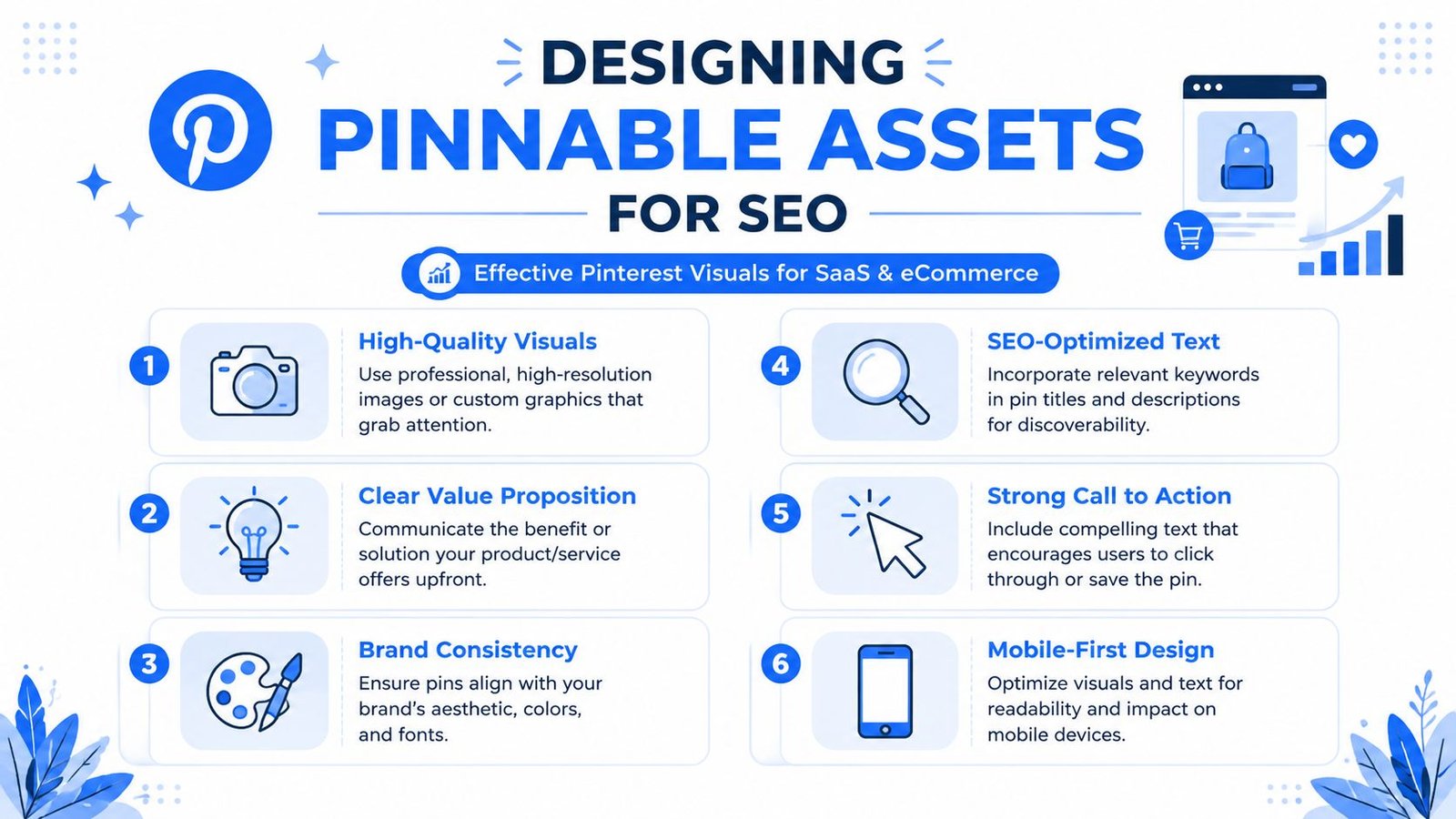
Pinterest's link network depends heavily on repins. Eighty percent of all Pins are repins, and the platform's ideal format is the 2:3 aspect ratio at 1000×1500 pixels for mobile visibility, according to Search Seven's analysis of Pinterest SEO mechanics. That one fact changes how you should think about creative. Your goal isn't just to attract a click. It's to create an asset people want to save and rebroadcast.
What SaaS teams should pin
Most SaaS companies underperform on Pinterest because they try to pin homepage messaging. That rarely works. Users save resources, workflows, comparisons, and planning tools.
The formats that usually travel better are:
- Template-led visuals such as onboarding checklists, CRM setup guides, email sequence frameworks, or reporting dashboards
- Comparison assets that help buyers evaluate tools, approaches, or feature categories
- Process graphics showing a workflow, audit sequence, funnel map, or team handoff
- Educational snapshots pulled from larger blog posts, webinars, or docs content
A strong SaaS Pin usually makes one promise fast. "Customer onboarding checklist." "B2B content audit framework." "Email handoff workflow." That clarity helps saves.
What eCommerce brands should pin
eCommerce wins when the Pin acts like a visual buying assistant, not an ad. A plain product shot with a logo is easy to ignore. A themed guide gives the user a reason to save it.
Useful formats include:
- Use-case collections like work-from-home desk setups, capsule wardrobe combinations, or skincare routine steps
- Buying guides tied to decision points, not just product categories
- How-to visuals showing styling, setup, pairing, or maintenance
- Seasonal planning assets that support intent before purchase
These assets don't need to feel editorial in the magazine sense. They need to feel helpful. The user should think, "I'll want this later."
Design for saves first and clicks second
Pinterest users often save before they visit. If you design only for direct click-through, you'll miss the repin behavior that expands link distribution.
That changes the creative brief. A high-performing Pin usually has:
- A readable headline that survives mobile viewing
- One clear benefit instead of a stack of claims
- Strong contrast so text doesn't disappear into the image
- Brand cues that are visible but not overpowering
- A layout built for portrait orientation, not a resized LinkedIn graphic
What doesn't work well:
| Asset style | Why it struggles |
|---|---|
| Homepage hero repurposed as a Pin | Feels like an ad and lacks save value |
| Tiny text blocks | Mobile users skip it |
| Overbranded graphics | Looks promotional rather than useful |
| Abstract illustrations with no hook | Weak search alignment and low save intent |
A Pin should stand on its own even if the viewer never sees your brand before that moment.
One practical workflow helps. Build three Pin variants for every important page: one benefit-led, one keyword-led, and one format-led. For example, the same page can become "SEO content brief template," "B2B keyword clustering guide," and "content ops checklist." Different entry points create more chances to earn backlinks from Pinterest without changing the destination URL.
The SEO-Driven Pinning and Distribution Workflow
Publishing on Pinterest isn't posting. It's indexing with creative attached. Teams that understand that get more durable returns because Pinterest content can keep sending traffic long after launch.
According to MindStick's explanation of Pinterest SEO benefits, Pins have a lifespan of months to years, and Pinterest ranking depends on keyword matches, user engagement, and content relevance. That gives you a very different operating model from channels where content disappears in a day. It also makes Pinterest one of the more durable content distribution channels for teams willing to optimize before publishing.
Start with Pinterest-native keyword research
Don't begin in Ahrefs, Semrush, or your SEO roadmap. Begin in Pinterest's search bar. Type the root term and watch the autosuggestions. Those suggestions reflect how users phrase intent on the platform.
For SaaS, this often surfaces adjacent intent you won't see in your product taxonomy. A brand that sells project management software may find stronger Pinterest language around workflows, planners, templates, client tracking, or team organization. For eCommerce, terms often cluster around routines, ideas, inspiration, and use occasions.
Use a simple filter when choosing keywords:
- Searchable on Pinterest rather than only meaningful to your internal team
- Close enough to the destination page that the click feels consistent
- Specific enough to inspire a visual angle
Build boards like topic clusters
Boards should behave like content hubs. Each board needs a clear topic identity, not a vague label like "Tips" or "Resources."
A stronger board structure might look like this:
| Weak board name | Better board name |
|---|---|
| Marketing | B2B Content Strategy Templates |
| Products | Desk Setup Accessories for Small Spaces |
| Growth | SaaS Onboarding and Retention Playbooks |
| Inspiration | Minimalist Skincare Routine Guides |
This helps in two ways. First, the board sets context for the Pin. Second, it gives you an organized place to publish multiple assets tied to the same theme without cannibalizing your own messaging.
Write Pins for search intent, not brand voice alone
Pin titles and descriptions should sound like the query the user would type. Brand voice still matters, but clarity wins.
A practical formula:
- Lead with the core topic
- Add the use case or audience
- Match the promise of the landing page
- Avoid stuffing extra terms just because they rank elsewhere
Examples:
- "Customer onboarding checklist for B2B SaaS teams"
- "Summer capsule wardrobe ideas for travel"
- "Technical SEO audit template for ecommerce sites"
Descriptions should reinforce the title, add context, and set the click expectation. The biggest mistake is writing like a social caption. Pinterest copy works better when it behaves more like metadata with persuasion layered in.
If the Pin promises one thing and the landing page opens with another, saves may happen, but conversions usually won't.
Distribution should stay controlled. Publish to the most relevant board first, then use alternate creative angles for other suitable boards later. Flooding many boards at once with near-identical Pins usually creates noise, not lift.
Advanced Tactics and Technical Link Considerations
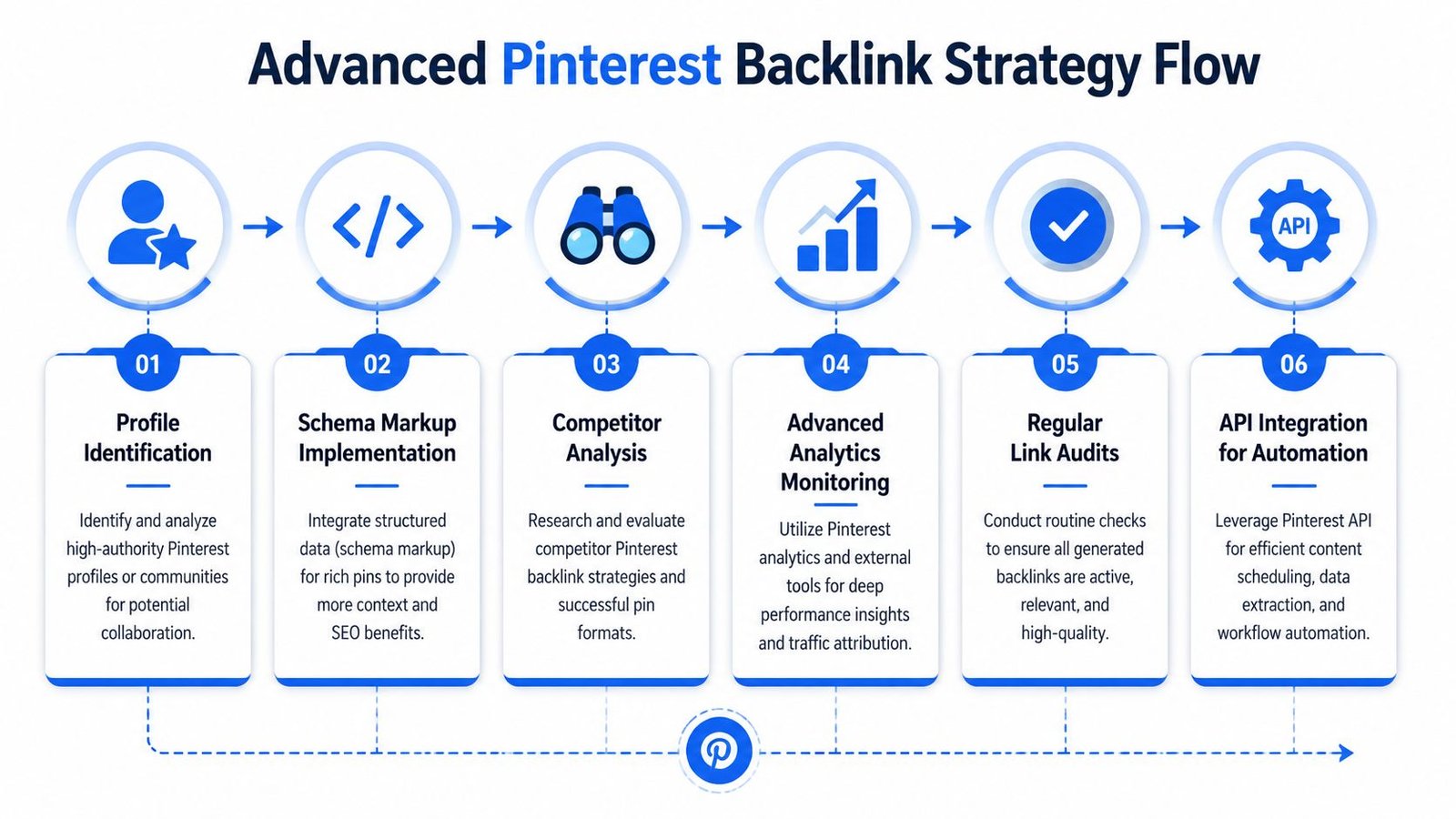
Most Pinterest advice stops at "make better Pins." That's beginner guidance. A competitive edge lies in link attributes, attribution discipline, and metadata signals that many organizations overlook.
The link attribute trade-off most teams ignore
Teams often write off Pinterest because many links start as nofollow. That framing is too shallow. The core question is whether your workflow is designed to create Pins that earn the traction needed for stronger SEO outcomes.
This shifts the tactic from "post everything" to "promote the pages most capable of ranking, converting, and being repinned." A product collection page with no differentiation isn't the best candidate. A category guide, template page, buying framework, or educational product page usually has more upside because users can save it as a resource.
Here's the trade-off in plain terms:
- High-volume low-value Pinning creates activity but weak business intent.
- Selective Pinning tied to strong pages gives fewer assets, but each one has a better chance to build meaningful equity.
Track with UTM discipline and protect canonicals
Use UTM parameters when you want granular attribution in GA4, especially if you're testing different creatives against the same URL. But don't let tracking clutter create SEO confusion on your site.
A practical approach:
- Use one consistent UTM naming pattern across campaign, board, and asset type.
- Point all tracked variants to pages with clean canonical tags so you're not manufacturing duplicate URL states in reporting and sharing.
- Keep the destination page stable while testing different Pins. If you change both creative and landing page at once, attribution becomes fuzzy.
This isn't just an analytics concern. It affects how confidently you can connect Pinterest activity to assisted conversions, content engagement, and eventual pipeline.
MCP trails are now part of the edge
The under-discussed development is MCP trails, short for Metadata Content Provenance. According to IndexJump's discussion of Pinterest backlink strategy, this is an emerging 2025 to 2026 trend, and Pinterest is prioritizing boards with explicit provenance trails for ranking. Most guides still ignore it.
That gap matters. If Pinterest is getting better at tracing where content came from, how it was organized, and what metadata supports it, then board quality is no longer only about keywords and visuals. It's also about signal integrity.
For practitioners, that changes board management:
| Old habit | Better practice |
|---|---|
| Treat boards like loose categories | Treat boards like documented topical entities |
| Upload assets with minimal context | Preserve source context, locale notes, and supporting metadata |
| Assume every useful signal is visible in the Pin | Assume Pinterest also evaluates provenance signals attached to the board and asset |
The next competitive edge on Pinterest won't come from prettier templates alone. It will come from cleaner metadata and better signal tracing.
You don't need to overengineer this. But you do need to audit whether your boards preserve source intent clearly, especially when multiple markets, product lines, or content teams are involved.
Tracking Attribution and Proving ROI
If Pinterest can't survive a reporting review, it won't survive budget season. You need a model that connects activity to traffic, links, and revenue signals without turning the channel into a spreadsheet hobby.
What to measure in GA4
Start with referral traffic from Pinterest. Build a GA4 report or exploration that isolates sessions from Pinterest and then compares landing pages, engaged sessions, key events, and conversion paths.
The useful questions are operational:
- Which landing pages attract Pinterest visitors who keep browsing
- Which Pins send visitors to commercial pages versus blog content
- Which boards are associated with the best assisted conversion behavior
- Whether Pinterest visitors subscribe, start trials, or purchase later through another channel
Don't judge Pinterest on last-click revenue alone. That will understate its role, especially for top-of-funnel educational assets and buying guides.
What to measure in Ahrefs or Semrush
Your SEO tool should answer a different question: are you increasing backlinks from Pinterest and are the right pages receiving them?
Monitor:
- New links from pinterest.com to the destination pages you're promoting
- Changes in the backlink profile for pages with active Pinterest distribution
- Whether support content or commercial pages earn more link activity
- Which content formats produce the cleanest blend of referral traffic and link growth
At this stage, many teams learn an important lesson. The pages that earn the most saves aren't always the pages that drive the best business outcomes. Sometimes a template page attracts broader distribution, while a product comparison page produces fewer visits but better conversion quality.
How to report Pinterest like a revenue channel
A useful dashboard usually includes one row per landing page or content cluster. Keep it simple enough that leadership can scan it.
Recommended columns:
| Reporting field | Why it matters |
|---|---|
| Pinned page | Shows what asset the program is actually supporting |
| Primary board | Helps you see whether topical placement affects quality |
| Referral sessions from Pinterest | Measures discovery and traffic flow |
| Engagement or conversion event | Connects traffic to business behavior |
| Links detected from Pinterest | Quantifies backlink acquisition |
| Creative notes | Explains what angle the Pin used |
Add commentary, not just numbers. If a Pin drove traffic but weak conversion behavior, say why. Maybe the Pin overpromised. Maybe the landing page was too top-of-funnel. Maybe the board topic was broad and attracted the wrong intent.
Report Pinterest like you would paid social with an SEO tail. Creative, placement, landing page, and attribution all matter.
The strongest Pinterest programs don't optimize for one metric. They look for alignment across discoverability, saves, referral quality, and page-level business value. That's how backlinks from Pinterest stop being a nice extra and start becoming part of a durable acquisition system.
If your team wants a Pinterest backlink strategy that's tied to rankings, referral quality, and revenue reporting, SaasSky helps SaaS and eCommerce brands build link systems with clear attribution and accountable execution.