

You've got a Snap ready to promote a feature launch, sale, webinar, or product drop. You record the video, open the editor, tap around for the link option, and the paperclip either doesn't work or the link never shows up the way you expected.
That's the part most Snapchat guides gloss over.
If you're trying to figure out how to add links to Snapchat Story posts in 2026, the answer is simple on the surface and messy in practice. Snapchat does support linked Stories, but access is restricted, the interface changes based on account type, and even correctly attached links can fail for parts of your audience because of app version fragmentation and regional feature gating.
Table of Contents
- Driving Traffic from Snapchat A Common Challenge
- Understanding Who Can Add Links on Snapchat
- A Step-by-Step Guide to Adding a Link Sticker
- Optimizing Your Link Sticker for Maximum Clicks
- Tracking Link Performance and Measuring ROI
- Troubleshooting Why Your Snapchat Link Is Not Working
Driving Traffic from Snapchat A Common Challenge
Snapchat can move attention fast, but sending that attention off-platform is where marketers get stuck. The app is built for quick consumption, not frictionless outbound traffic, so the usual expectation of “post Story, add link, get clicks” breaks down quickly.
That's especially frustrating for SaaS and eCommerce teams. Product marketers want to push users to feature pages, demos, waitlists, or help docs. Store operators want to send traffic to collection pages, launches, and limited offers. Snapchat can support that motion, but only if your account setup and execution line up with Snapchat's rules.
Many organizations lose time because they treat Snapchat like Instagram. It isn't. The workflow for links is narrower, account access matters more, and the practical path often involves campaign planning outside the app, not just inside it. If you're building a broader acquisition mix, it helps to view Snapchat as one of several content distribution channels for growth rather than a universal link-sharing surface.
Snapchat can generate strong intent from short creative, but only when the outbound path is visible, supported, and trackable.
The good news is that linked Stories are possible for the right account types. The bigger opportunity is knowing what is effective, what doesn't, and when to use a workaround instead of forcing a feature your account doesn't have.
Understanding Who Can Add Links on Snapchat
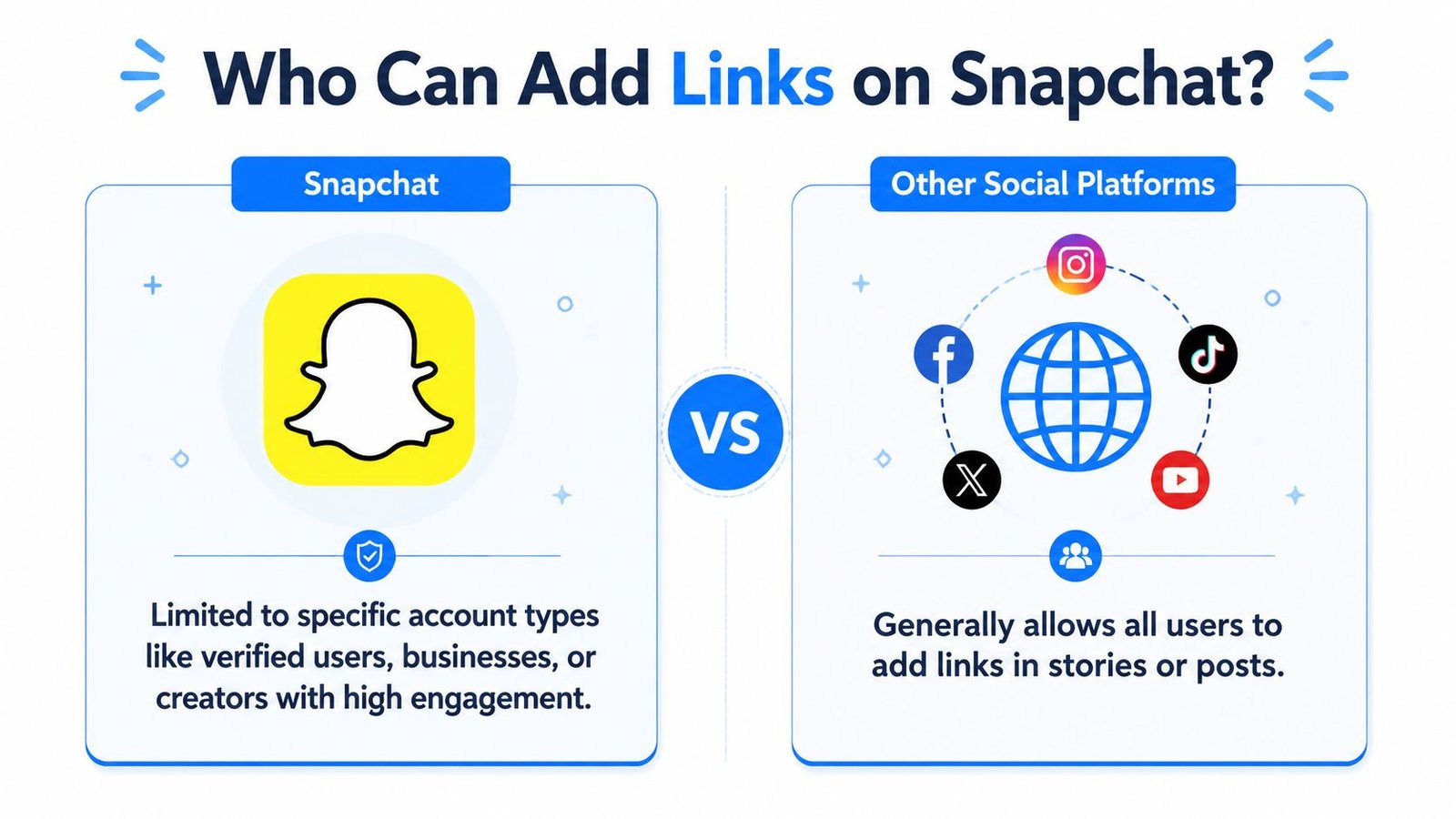
The first thing to know is that not every Snapchat account can add clickable links to public Stories. That's the core reason so many tutorials feel misleading. They describe the paperclip flow as if it applies to everyone, when it doesn't.
According to Snapchat link access data cited in Q1 2025 analytics, only 12% of active users, around 28.4 million, have access to the Link Sticker for public Stories. The same data notes that the feature is primarily for verified business accounts, and that 34% of all Snapchat link clicks in 2024 came from business accounts using the Link Sticker, while only 2.1% came from regular users attempting a paperclip method.
What the inactive paperclip usually means
If you can see the paperclip icon but can't use it for a public Story, that usually points to an account eligibility issue, not a formatting mistake. Snapchat's setup is restrictive by design. The icon can appear in the interface, but it isn't fully functional for public Story posting unless the account qualifies.
That matters because a lot of users assume the feature is bugged. In many cases, it isn't bugged at all. The account doesn't have public Story link permission.
Here's the practical split:
| Account type | What usually happens with links |
|---|---|
| Verified business account | Can use the Link Sticker for public Stories if the feature is enabled |
| Verified creator with access enabled | May have access depending on account status and dashboard setup |
| Regular personal account | Can often attach links directly to snaps sent to friends, but not to public Stories |
What this means for marketers
For brands, this changes planning. If you're running Snapchat for a SaaS company or online store, don't build a campaign around Story clicks until you've confirmed access inside the account. Check the app version, verify business status, and confirm the link feature is enabled in the dashboard before creative production starts.
Practical rule: Treat Snapchat Story linking as an account privilege, not a default platform feature.
If your brand account doesn't qualify, you can still use Snapchat for awareness, product teases, and direct sharing to friends or private audiences. But if your goal is scalable public Story traffic, eligibility comes first.
A Step-by-Step Guide to Adding a Link Sticker
Once the account has access, the setup itself is straightforward. The issue isn't complexity. It's that marketers often start the process without confirming eligibility, then assume they missed a button.
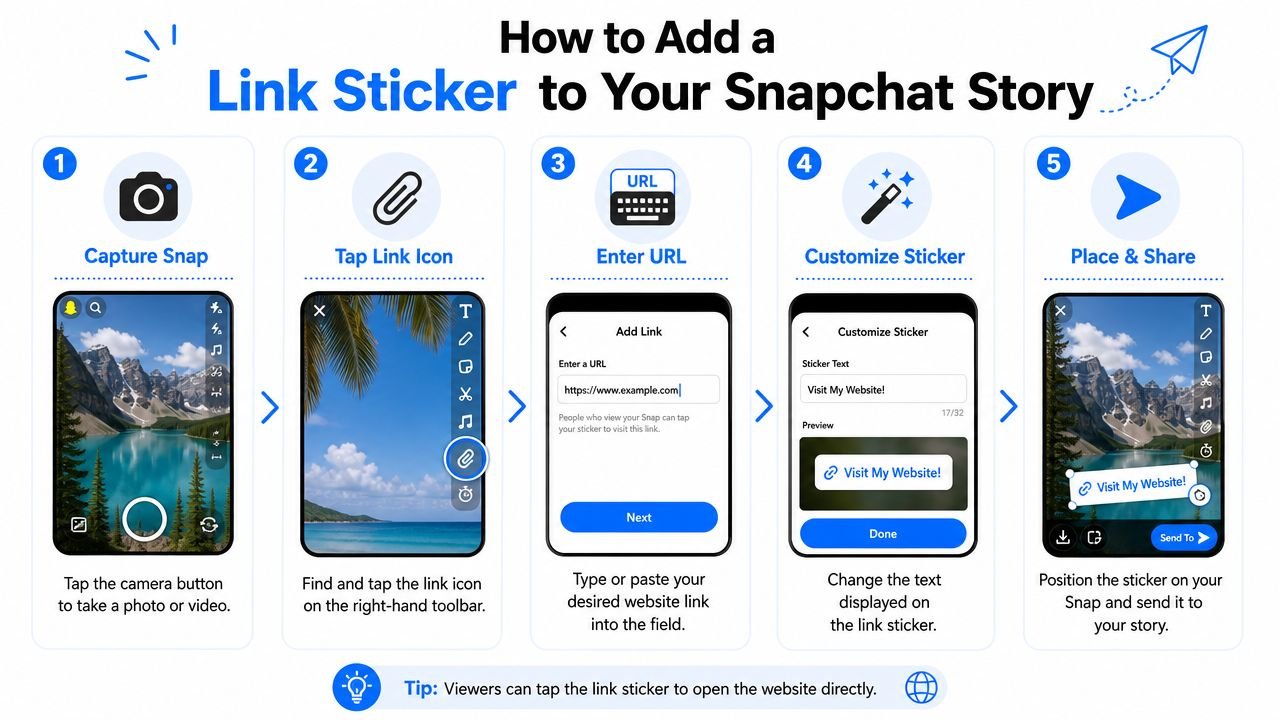
According to the 2024 Snapchat link guide reference, the workflow has six key steps, starting with the latest app version v23.4.0 or higher, then creating a snap, tapping the paperclip icon, pasting the URL, tapping Attach to Snap, confirming the icon illuminates, and posting to Story. The same source notes that 63% of users who try this fail because the paperclip icon is inactive on non-business accounts.
The exact tap-by-tap process
Use this sequence when your account already has access:
Update the Snapchat app
Make sure you're on v23.4.0 or higher. Older app versions can create confusion because the relevant interface elements may not appear or may behave differently.Capture or upload your creative
Record a photo or video snap, or upload an asset from your device. The link option appears after the snap is created, not before.Tap the paperclip icon
Look at the vertical toolbar on the right side of the preview screen. On some device layouts, you may first see a downward arrow that leads to the paperclip option.Paste or type the destination URL
Enter the page you want users to visit in the URL field.Tap Attach to Snap
Snapchat needs to load the page successfully. If it does, the link is attached.Confirm the icon changes state
The paperclip icon should illuminate, which acts as the visual confirmation that the link is active.Post to Story
Tap the blue arrow and choose Story if your account supports public posting with links.
What to look for on screen
The fastest way to verify success is visual. If the URL attaches properly, the paperclip changes state and the snap carries a tappable sticker overlay. At that point, reposition the sticker before publishing.
If the icon never activates, stop troubleshooting the URL first. Check the account type and link permissions before changing the page, shortening the URL, or re-editing the creative. In practice, marketers waste a lot of time fixing the wrong variable.
If the paperclip is visible but inactive, the problem is often account access, not the destination page.
iPhone and Android differences that matter
The broad process is the same on iOS and Android. The differences are mostly interface placement and menu layering. On one device, the paperclip may appear directly in the right-side toolbar. On another, it may sit behind a small expansion control.
That's why internal team SOPs should describe the visual cue, not just “tap the paperclip.” Say where it appears, when it appears, and what success looks like after the tap. That removes most handoff confusion between social teams, founders, and freelance creators.
Two mistakes that waste campaigns
A lot of Snapchat traffic campaigns fail before launch because of avoidable setup errors:
Posting without verifying account eligibility
The creative may be strong, but the Story won't drive clicks if public link access isn't enabled.Linking to weak destinations
If you send users to a generic homepage, they'll bounce. Use direct pages such as a product detail page, feature page, signup page, or launch landing page.
For SaaS, the best destination is usually the exact asset the Story promises. For eCommerce, it's usually the product, bundle, or collection page shown in the snap.
Optimizing Your Link Sticker for Maximum Clicks
Getting the sticker attached is only half the job. People still have to notice it, understand it, and trust the tap.

The placement of the sticker matters more than many teams think. The guidance summarized in the Snapchat Story link placement reference recommends placing the sticker in high-contrast areas away from the main subject, and notes that poor placement creating visual clutter can reduce click-through rates by up to 40%.
Place the sticker where the eye can find it
The mistake I see most often is putting the sticker right on top of the product, speaker, or text headline. That feels intuitive because it's “central,” but it usually hurts performance. Users focus on the main visual first. If the sticker blends into that zone, it doesn't read as a tappable next step.
Better placement usually means:
Use contrast first
Put the sticker where the background makes it visible immediately.Protect the focal point
Keep it near the action, not on the action.Avoid interface collisions
Leave breathing room from edge areas where app chrome or habitual thumb movement can distract from the CTA.
Write a CTA that matches intent
“Tap here” is serviceable, but it's weak. Snapchat traffic improves when the text around the sticker tells users what they get after the tap.
For SaaS, stronger prompts include a clear next action tied to value:
- See the new feature
- Read the full walkthrough
- Start the free trial
- Watch the demo
For eCommerce, clarity wins:
- Shop the drop
- See color options
- Claim today's offer
- View the full set
A good rule is to align the Story creative, the sticker placement, and the landing page promise. If the snap shows a product in use, the CTA should lead to that product page, not a general category. If you want more rigor on destination quality before you launch paid or organic traffic, run the page through a website auditing checklist for conversion issues.
Design note: A visible sticker with a weak destination still underperforms. The tap and the landing page have to work together.
Add motion without clutter
Snapchat gives you text, stickers, and creative overlays. Use them sparingly. A small directional cue, short CTA text, or clean visual framing can help. Too many decorative layers make the link feel like part of the design instead of the action.
For brand teams, this is a useful creative restraint: one primary message, one visual focus, one tap target.
Tracking Link Performance and Measuring ROI
If you're sending Snapchat users to a site without tracking, you're guessing. Native platform signals can tell you part of the story, but they usually won't give you the campaign detail a performance marketer needs.
The practical fix is simple. Build every Snapchat link as a tracked campaign URL, then shorten it if needed for cleaner management and reporting. Snapchat's ecosystem already overlaps with tools used for link management, so this workflow fits naturally into a real campaign process.
Use UTM parameters on every destination
For SaaS and eCommerce brands, the minimum setup is a destination URL with consistent UTM parameters. Keep naming conventions tight across campaigns so you can compare performance cleanly in analytics tools.
A basic structure looks like this:
- Source set to Snapchat
- Medium set to a channel label your team uses consistently
- Campaign tied to the launch, offer, product drop, or content theme
- Content used to distinguish creative variants if you're testing multiple Story angles
That structure lets you answer the questions that matter. Which Story drove visits? Which creative drove signups? Which offer drove product page sessions and purchases? Without those labels, Snapchat traffic ends up mixed into broader buckets and loses decision-making value.
Shorteners help with cleaner operations
URL shorteners are useful here for two reasons. First, they make link handling cleaner when social teams, founders, or creators are moving quickly across campaigns. Second, they create a second layer of click tracking outside your site analytics.
That matters when you need to separate three different outcomes:
| Signal | What it tells you |
|---|---|
| Sticker taps or short-link clicks | People interacted with the Story link |
| Site sessions | The destination loaded and analytics captured the visit |
| Conversions | The visit produced a signup, purchase, or lead |
If those numbers don't line up, the problem may sit with the page load, attribution setup, or destination experience rather than the Story itself.
Measure downstream, not just clicks
For SaaS teams, the primary KPI usually isn't the click. It's trial starts, demo requests, or product-qualified sessions. For eCommerce, it's revenue-driving actions such as add-to-cart behavior, checkout starts, and purchases.
That's why Snapchat should feed into the same reporting logic you use for search, email, and paid social. If you're auditing traffic quality across channels, it helps to benchmark Snapchat against your broader organic traffic measurement approach, especially when deciding whether Snapchat belongs in your repeatable acquisition mix.
A tracked Snapchat Story is useful. A tracked Story tied to conversion events is what makes budget decisions easier.
Troubleshooting Why Your Snapchat Link Is Not Working
Sometimes the link is attached correctly and people still can't use it. That's the part most articles skip, and it's why marketers get conflicting feedback from users who all saw the same Story.

According to reporting on inconsistent Snapchat link behavior, 34% of Snapchat users aged 18 to 24 in the US and EU report inconsistent link behavior, often due to app version fragmentation and regional feature gating. That means a link can be set up properly on your side and still behave inconsistently for parts of your audience.
The hidden reasons links fail
This usually shows up in a few ways:
Different app versions render Stories differently
One viewer gets a tappable experience. Another sees something that looks attached but doesn't behave the same way.Regional rollout rules affect availability
Features can appear stable in one market and partial in another.Audience feedback sounds contradictory
Some users say the link works. Others say it doesn't exist, won't open, or acts like an expired action.
What to do when this happens
Don't rely on “update the app” as your only response. It's worth suggesting, but it's incomplete. A better troubleshooting sequence is:
- Confirm the account had valid link access at publish time
- Test the Story on multiple devices if your team has them
- Check the destination URL outside Snapchat
- Review audience complaints by region or device type
- Use alternate CTAs in follow-up Stories if failures cluster
If repeated user complaints come from a specific market or age-heavy audience segment, assume the issue may be environmental, not operator error. In those situations, marketers often get better results from repeating the CTA in another Story frame, directing users to a profile path, or using parallel campaign support on other platforms instead of forcing Snapchat to carry the whole conversion journey.
If your team wants help building traffic systems that don't stop at posting, SaasSky works with SaaS and eCommerce brands on link-driven growth, from campaign pages and content strategy to the authority signals that help those pages rank and convert over time.