
You push a site update on Friday. By Monday, the dev team is asking why staging URLs are showing up in search, paid landing pages aren't being crawled, and an AI bot has started hammering endpoints you never meant to expose. Nothing “broke” in the usual sense. The site loads. Pages render. Orders still go through. But your crawl controls are off, and that's enough to create a mess.
That's why robots.txt matters more than often realized. It looks small, almost harmless. A plain text file with a few lines. Yet it sits right at the front door of your site and shapes how bots spend their time, which areas they touch first, and whether they waste requests on junk URLs instead of the pages that matter.
Most robots txt best practices articles stop at Googlebot. That's no longer enough. A modern file needs to handle classic search crawlers, support efficient discovery, and give you a deliberate policy for AI crawlers and other emerging bots. If you treat robots.txt like a one-time SEO checkbox, it will drift out of sync with your site. If you treat it like access governance, it becomes a practical control system.
Table of Contents
- Why Your Robots txt File Is a High-Stakes SEO Tool
- Understanding Core Robots txt Concepts
- Essential Directives and Syntax Explained
- Common Robots txt Mistakes and How to Fix Them
- Advanced Rules for SaaS and eCommerce Websites
- The New Frontier Managing AI and Emerging Crawlers
- Your Robots txt Workflow and Audit Checklist
Why Your Robots txt File Is a High-Stakes SEO Tool
A bad robots.txt file rarely announces itself with a dramatic outage. It causes quieter failures. Product pages stop getting refreshed in crawl cycles. Thin internal URLs stay open and absorb bot attention. A staging area gets discovered because nobody locked it down properly. Then marketing sees visibility issues and assumes the content or links are the problem.
In practice, robots.txt is a traffic management file with business impact. It tells compliant crawlers where not to spend time. That matters when your site generates endless low-value URLs from search filters, internal tools, account areas, tracking parameters, or faceted navigation. If crawlers spend energy there, they spend less attention on your revenue pages.
The simplest analogy is a doorman. A good doorman doesn't hide the building. He directs visitors efficiently. He sends the public to the lobby, keeps them out of staff-only areas, and prevents crowds from clogging the wrong entrance. That's the role robots.txt plays for crawl management.
Practical rule: If your site has areas that humans need but search engines don't, robots.txt is often the first place to define that boundary.
Founders and marketers usually feel the pain in three places:
- Wasted crawl activity: Bots keep hitting login, cart, parameter, or preview URLs.
- Accidental exposure: Non-production or thin pages become crawlable because nobody set rules at launch.
- Misused expectations: Teams try to “hide” pages with robots.txt and later discover those URLs can still appear in search contexts.
Robots txt best practices aren't about writing the longest file. They're about making intentional trade-offs. Block low-value crawl paths. Keep important assets reachable. Make the file easy to reason about. And update it as the site evolves, not only when something goes wrong.
Understanding Core Robots txt Concepts
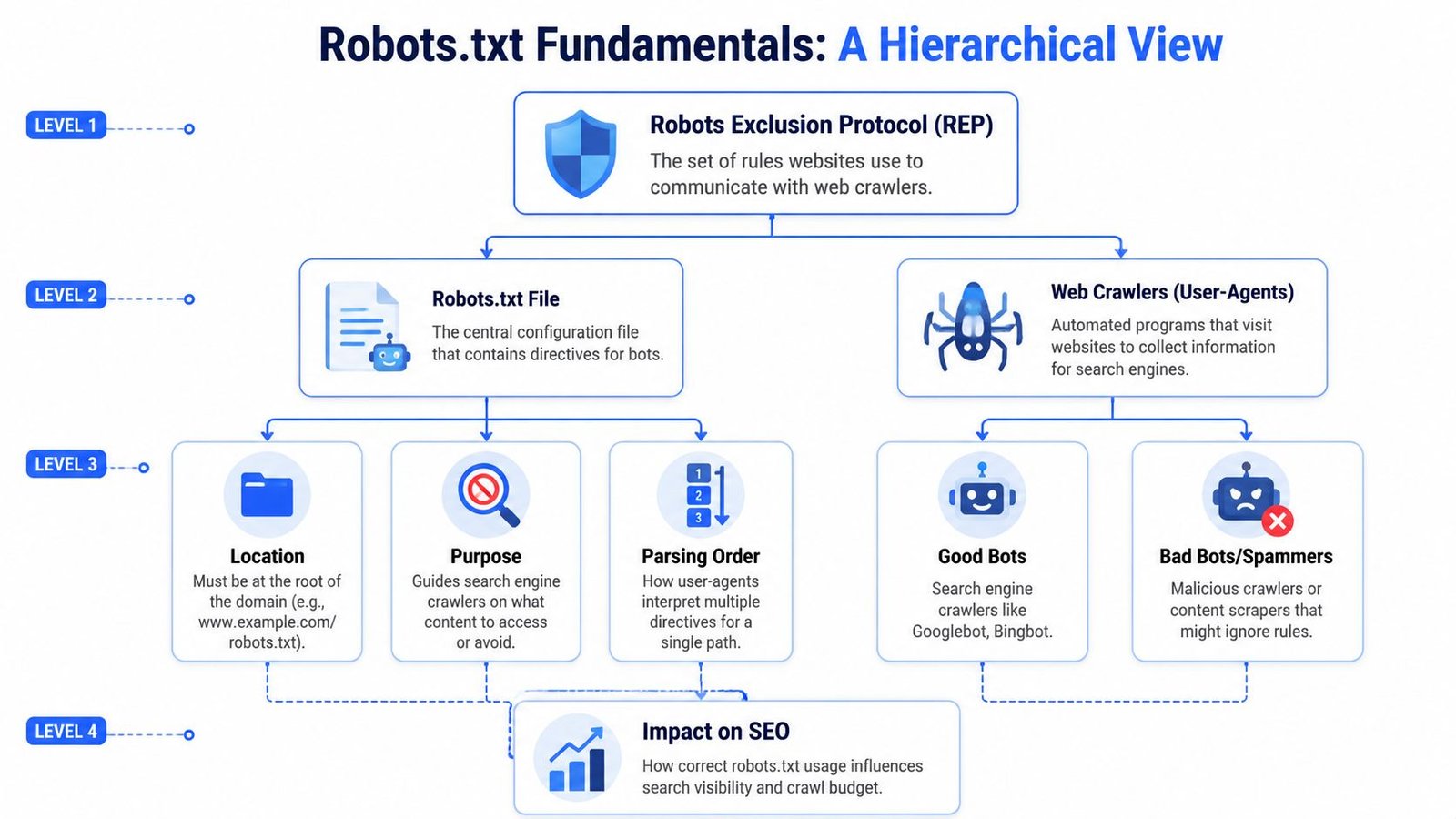
The modern robots.txt standard comes from the Robots Exclusion Protocol, first proposed in 1994. Google describes robots.txt primarily as a way to manage crawler traffic, not as a guaranteed method for keeping pages out of search results. Google also notes several baseline rules: place the file at the root of each host, keep it under the 500 KiB processing limit, and don't use it to hide sensitive content, as explained in Google's robots.txt documentation.
What robots txt actually does
Robots.txt gives instructions to crawlers that choose to honor the protocol. That means it's a request layer, not a security layer. It can reduce unnecessary crawling and help shape crawl paths. It does not act like authentication, and it doesn't replace permissions, passwords, or proper environment controls.
That distinction matters because teams often write rules for private areas and assume that's enough. It isn't. If a page is sensitive, protect it directly. Robots.txt is for crawler guidance, not secrecy.
A useful way to think about it is this:
| Purpose | Good fit for robots.txt | Bad fit for robots.txt |
|---|---|---|
| Crawl management | Yes | |
| Server load control | Yes | |
| Directing bots toward public content | Yes | |
| Keeping confidential content secure | Yes | |
| Guaranteeing no search appearance | Yes |
Where the file must live
Placement is strict. The file has to sit at the root path so crawlers can fetch /robots.txt. Not in a folder. Not behind a redirect maze. Not as a generated page on a random URL.
If you manage multiple hosts or subdomains, each one needs its own handling. A common source of confusion is assuming one file covers the whole brand footprint. It doesn't work that way.
- Root-level only: Crawlers look for
/robots.txton that host. - One file per host: You can't scatter multiple versions across the same host and expect predictable behavior.
- Keep it compact: Huge files become harder to maintain and reason about.
Robots.txt works best when it stays boring. Short file, clear intent, minimal surprises.
Crawling is not indexing
This is the mistake that creates the most confusion. Blocking crawling is not the same as preventing indexing. If you block a URL in robots.txt, a search engine may still know that URL exists through links or other signals. That's why robots.txt is the wrong tool when the objective is “don't show this page in search.”
For pages that must stay out of search results, use indexing controls on crawlable pages or protect the content directly. Robots.txt is still useful there, but only when paired with the right mechanism for the actual outcome you want.
That single distinction saves teams from a lot of self-inflicted damage. If you remember only one thing from this section, remember that.
Essential Directives and Syntax Explained
Robots.txt syntax is simple enough to learn in one sitting. The hard part isn't the vocabulary. It's being precise about what you want to allow, what you want to block, and which bots the rules apply to.

The directives you will use most
At a practical level, most files rely on four directives:
- User-agent tells you which crawler the rule set is for.
- Disallow tells that crawler not to access a path.
- Allow creates an exception inside a broader blocked area.
- Sitemap points crawlers to your XML sitemap location.
A basic example looks like this:
User-agent: *
Disallow: /admin/
Disallow: /login/
Sitemap: https://www.example.com/sitemap.xml
That says all crawlers should avoid the admin and login sections, while the sitemap gives them a clean discovery route to your important URLs.
Targeting a specific bot is just as straightforward:
User-agent: Googlebot
Disallow: /internal-search/

User-agent: *
Disallow: /private/
In that example, Googlebot gets one specific rule, and all bots get a broader rule set.
If you're also managing link-level crawling and indexing signals, it helps to understand how robots directives differ from page-level link directives such as those discussed in this guide to follow and nofollow links. They solve different problems and shouldn't be treated as substitutes.
How wildcards change the rule
Wildcards are useful, but they're also where small mistakes become large ones.
The * character matches patterns broadly. The $ character anchors the end of a URL pattern. Used carefully, they save you from writing dozens of repetitive lines. Used carelessly, they block entire sections you meant to keep open.
Here's the practical difference:
User-agent: *
Disallow: /search*
That blocks URLs beginning with /search and their variations.
User-agent: *
Disallow: /thank-you$
That blocks the exact URL ending in /thank-you without automatically applying the rule to longer variations.
When you use wildcards, test against real URL examples from your own site. Don't trust your memory of how the pattern “should” behave.
Practical examples you can adapt
Below are common patterns that work well when the intent is clear.
1. Block admin and account areas, keep the rest open
User-agent: *
Disallow: /admin/
Disallow: /account/
Disallow: /checkout/
Sitemap: https://www.example.com/sitemap.xml
This works for many sites because those areas don't need crawler attention.
2. Block a folder but allow a public child path
User-agent: *
Disallow: /assets/
Allow: /assets/public/
This structure is useful when most of a directory is operational or internal, but one subfolder contains files that should remain crawlable.
3. Block specific file patterns
User-agent: *
Disallow: /*?sort=
Disallow: /*?sessionid=
This is common on eCommerce builds where URL parameters create duplicate or low-value crawl paths.
4. Create bot-specific AI rules
User-agent: GPTBot
Disallow: /

User-agent: *
Disallow: /staging/
Disallow: /preview/
That example blocks one named AI crawler completely while leaving the broader rule set focused on normal crawl hygiene.
A few syntax habits make files easier to maintain:
- Use comments sparingly but clearly: Explain why a rule exists, especially if the path name isn't obvious.
- Group related directives together: Keep account, checkout, search, or preview rules in logical blocks.
- Prefer simple patterns over clever ones: The best rule is the one your future team can read instantly.
Here's a maintainable format:
# Public site rules
User-agent: *
Disallow: /login/
Disallow: /cart/
Disallow: /search/

# AI crawler policy
User-agent: GPTBot
Disallow: /
That's the heart of strong robots txt best practices. Clear grouping. Narrow intent. Fewer surprises.
Common Robots txt Mistakes and How to Fix Them
Most robots.txt problems come from confusion, not complexity. A team tries to solve one issue and creates another. The fix is usually less about advanced SEO and more about matching the rule to the actual goal.
Blocking the wrong thing
One common error is blocking pages that you still need crawlers to render correctly. If you cut off access to required CSS, JavaScript, or supporting resources, crawlers may get an incomplete view of the page. That can lead to weak rendering, misread layouts, or missed content relationships.
The fix is simple. Audit what the page needs to load properly, then avoid broad directory blocks that catch those files. If your rule says Disallow: /assets/, make sure you really want all of /assets/ inaccessible.
Another mistake is using Disallow when the actual objective is “don't let this page appear in search.” That's a mismatch of tool and outcome. In those cases, use the correct indexing control on a crawlable URL or protect the page directly.
Forgetting host and protocol scope
A critical technical rule is that robots.txt directives apply only to the exact host, protocol, and port where the file is located. That means https://www.example.com and http://example.com need separate handling, which is a common reason rules appear to work in testing but fail elsewhere, as noted in Conductor's explanation of robots.txt scope.
This trips up a lot of teams during migrations and redesigns. They validate one version of the site, then assume all variants inherit the same protection.
Use this mental check:
| Version | Needs its own robots.txt handling |
|---|---|
https://www.example.com |
Yes |
http://www.example.com |
Yes |
https://example.com |
Yes |
| A separate subdomain | Yes |
If your brand runs a main site, help center, app subdomain, and staging environment, think of them as separate entrances. Each needs its own posted rules.
A rule that protects one host does nothing for another host unless you publish the file there too.
Writing rules nobody can maintain
The final category is operational. The file “works,” but nobody knows why a line was added, whether it still matters, or what would break if they removed it. That's how stale directives survive for years.
The fix is process discipline:
- Comment intent: Add short notes for non-obvious rules.
- Delete dead directives: If a path no longer exists, remove the rule.
- Review after releases: New templates, filters, and subdomains often require updates.
- Keep patterns human-readable: Long, cryptic wildcard chains create avoidable risk.
A robots.txt file should be short enough that a founder, marketer, or product manager can scan it and understand the broad logic. If it reads like a puzzle, it needs cleanup.
Advanced Rules for SaaS and eCommerce Websites
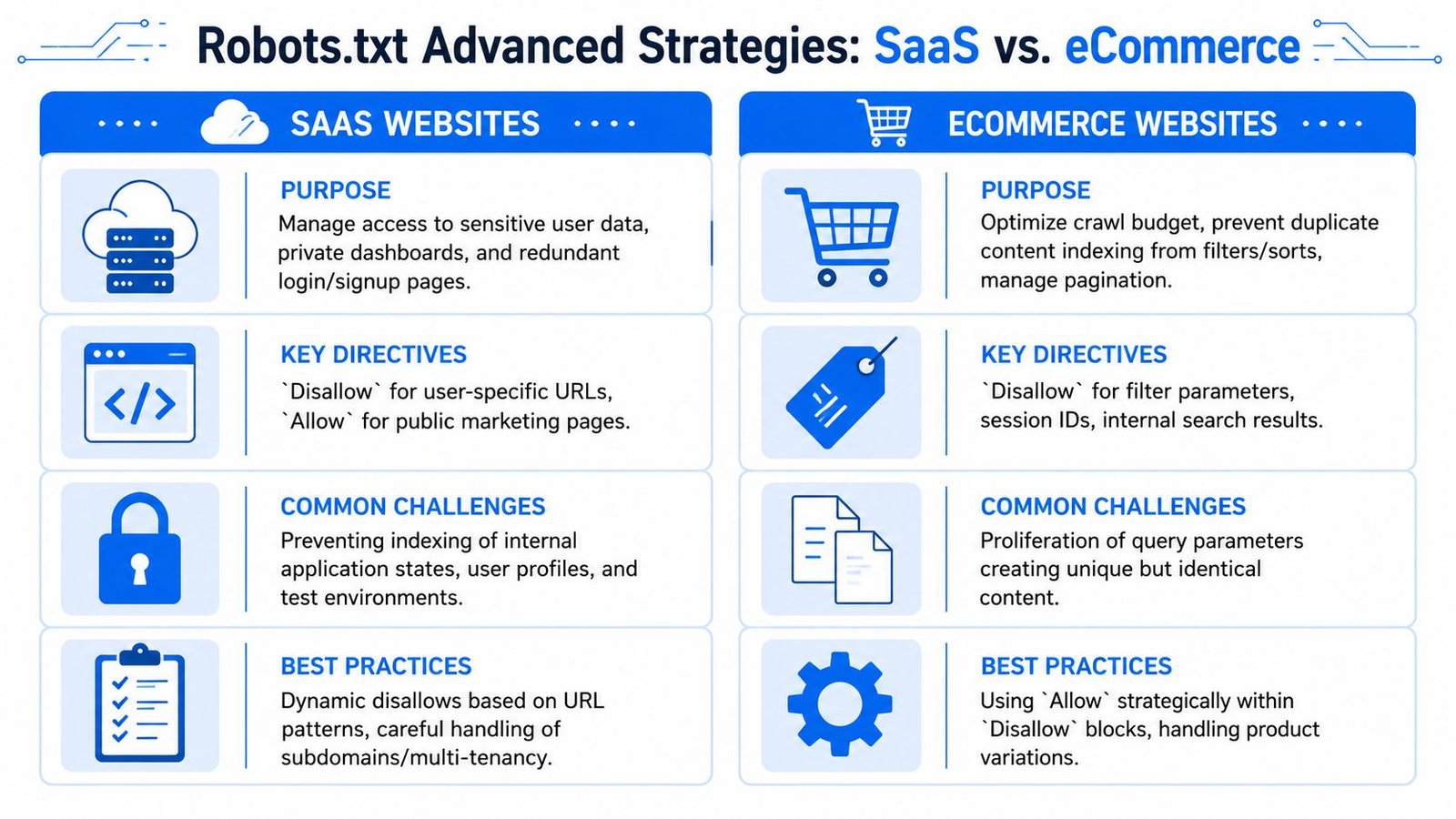
Generic robots txt best practices break down fast when the site is dynamic. SaaS and eCommerce sites generate URL patterns that standard brochure sites don't. If you use the same file structure for all of them, you usually end up overblocking public value or underblocking crawl waste.
SaaS patterns that deserve blocking
SaaS sites often blend a marketing site with an application layer. That creates a sharp divide between public pages you want crawled and authenticated states you don't.
Common candidates for blocking include:
- User dashboards: Account-specific pages rarely offer public search value.
- Admin routes: Internal control panels shouldn't attract crawler attention.
- Trial and preview paths: These often create thin or temporary URLs.
- App-generated duplicates: Shared templates can spawn many near-identical states.
A practical SaaS file might look like this:
User-agent: *
Disallow: /app/
Disallow: /dashboard/
Disallow: /admin/
Disallow: /preview/
Disallow: /trial/
Sitemap: https://www.example.com/sitemap.xml
The logic is simple. Keep crawlers focused on docs, solution pages, feature pages, templates, and public resources. Keep them out of logged-in states and disposable environments.
If your SaaS platform spans marketing pages, documentation, and app subdomains, align robots decisions with your overall site structure for SEO so the crawl map matches the way value is organized.
eCommerce patterns that waste crawl attention
eCommerce creates a different kind of problem. The issue usually isn't private content. It's scale. Filters, sorts, pagination variants, internal search pages, and parameter-driven URLs can multiply faster than teams realize.
The file should usually protect crawlers from endless combinations while leaving core category and product URLs open.
A practical eCommerce example:
User-agent: *
Disallow: /cart/
Disallow: /checkout/
Disallow: /search
Disallow: /*?sort=
Disallow: /*?filter=
Disallow: /*?sessionid=
Sitemap: https://www.example.com/sitemap.xml
That doesn't solve duplicate content by itself, but it does stop crawlers from wandering through low-value combinations all day.
A side-by-side comparison
The contrast is useful because the intent differs by model.
| Business type | Main robots.txt priority | Typical blocked areas | Main risk if done poorly |
|---|---|---|---|
| SaaS | Separate public content from app states | dashboards, admin, previews, trials | Private or thin app URLs get crawled |
| eCommerce | Reduce crawl waste from URL variation | cart, checkout, filters, sort parameters, internal search | Crawl attention gets diluted across duplicate combinations |
For SaaS, think access boundaries.
For eCommerce, think path discipline.
There's also a shared principle. Don't block first and ask questions later. On both site types, overblocking can cut crawlers off from pages that support revenue, discovery, and internal linking. The right file is selective, not aggressive.
The New Frontier Managing AI and Emerging Crawlers
A robots.txt strategy built only around Googlebot is now incomplete. Sites face a wider ecosystem of crawlers with different purposes, different value, and different risk profiles. Some support search discovery. Some support AI model retrieval or training. Some are useful. Some are opportunistic.
Modern best practices are expanding to include AI crawler rules such as directives for GPTBot and emerging standards like LLMs.txt, reflecting a shift from search-only access management to broader bot governance, as discussed in this overview of robots.txt, AI crawlers, and LLMs.txt.
Why search-only governance is outdated
For years, many teams asked one question: “What should Googlebot crawl?”
Now the better question is: “Which bots should access which parts of our site, for what purpose?”
That's a broader policy decision. You may want classic search crawlers to access public resources freely. You may want to limit AI crawlers from using your content. You may want to isolate staging and preview paths from all automated access. And you may want monitoring around stale bot rules so the file doesn't lag behind your actual content strategy.
Robots.txt best practices start looking more like governance than syntax.
Search bots are no longer the only audience for your crawl policy. Your file should reflect that reality.
How to structure AI bot rules
The cleanest approach is to treat AI bots as a separate policy block rather than mixing them into generic wildcard logic.
A simple structure looks like this:
User-agent: GPTBot
Disallow: /

User-agent: *
Disallow: /staging/
Disallow: /preview/
Sitemap: https://www.example.com/sitemap.xml
That format helps in three ways:
- Clarity: Anyone reviewing the file can see the AI policy immediately.
- Flexibility: You can revise one bot group without disturbing global rules.
- Governance: Legal, content, and product teams can weigh in on a named policy block.
If you decide to allow some AI crawlers and block others, keep the file readable. Don't create a tangle of overlapping exceptions unless you have a documented reason.
Where LLMs txt fits
LLMs.txt is best viewed as complementary, not as a replacement for robots.txt. Robots.txt still handles crawler access requests. LLMs.txt enters the conversation as a way to communicate content preferences and relevance in an AI-oriented ecosystem.
That means your modern stack may include:
- Robots.txt for access rules
- XML sitemaps for discovery
- Indexing directives for search appearance control
- LLMs.txt for emerging AI-facing guidance
The practical takeaway is straightforward. Decide your AI content policy on purpose. Then publish that decision in a form your team can audit and maintain.
Your Robots txt Workflow and Audit Checklist
Most robots.txt failures happen during normal site change. New templates launch. A dev environment goes public. Parameter rules get added in a rush. Someone copies an old file forward without checking whether the assumptions still hold.
A working process prevents that.
A safe operating workflow
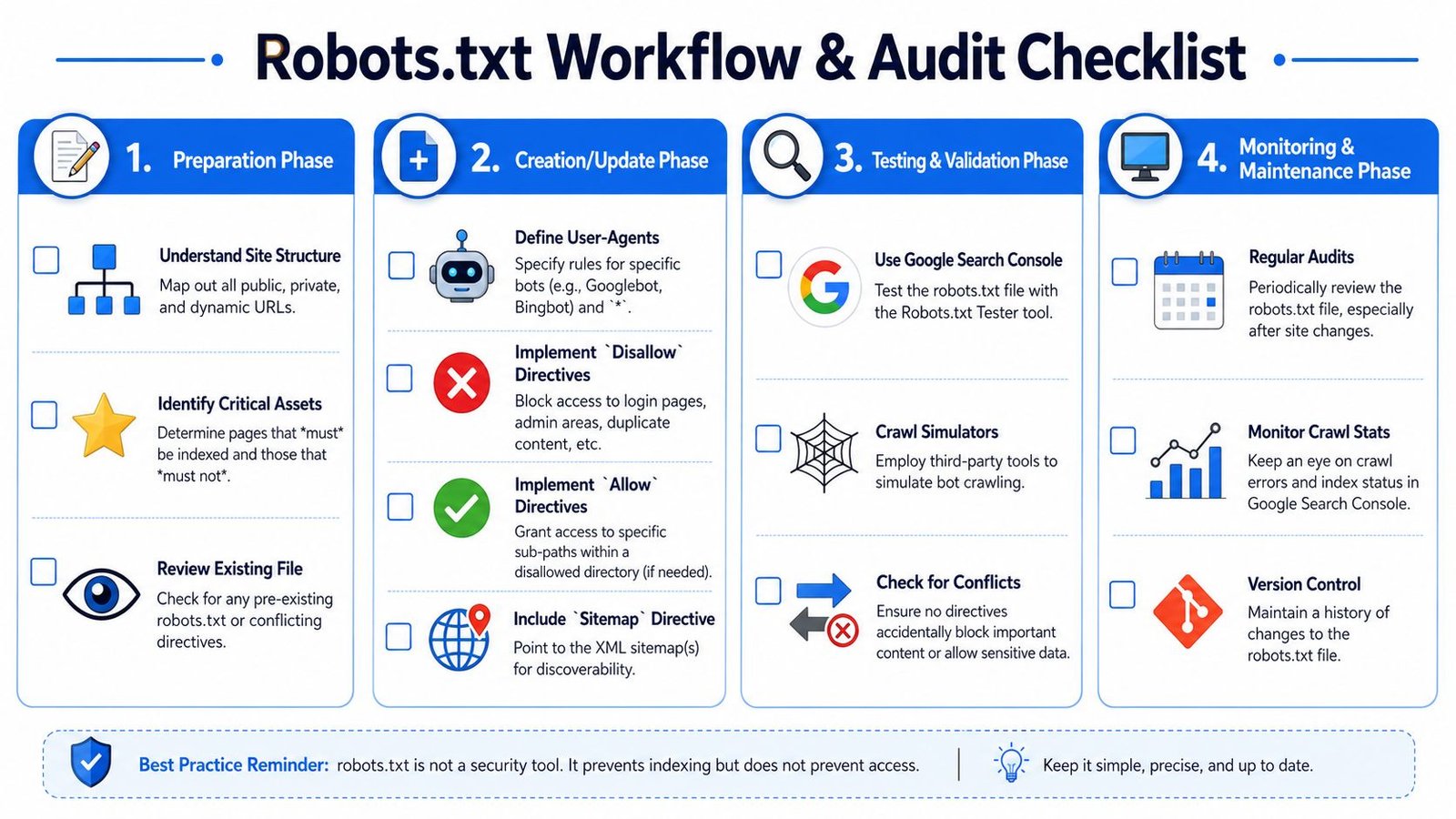
Start with a URL inventory. Map public pages, private areas, faceted paths, internal search results, app states, and non-production spaces. Then decide what compliant crawlers should reach, what they should avoid, and which bots need custom treatment.
Before deployment, test the file in Google Search Console's robots.txt tooling and inspect important URLs that depend on crawl access. For larger sites, third-party crawlers can help simulate whether the rules behave as intended.
After launch, monitor crawl behavior and indexation patterns. If important pages stop getting picked up or low-value URLs start drawing attention, revisit the file quickly.
A lightweight workflow looks like this:
- Inventory the site: Include hosts, subdomains, app areas, and parameter patterns.
- Write rules by intent: Public content, internal utilities, AI policy, sitemap location.
- Test before publishing: Validate syntax and spot accidental blocks.
- Deploy with version control: Treat robots.txt like production code.
- Review after site changes: Especially after redesigns, migrations, and feature launches.
For broader technical reviews that catch related issues beyond crawl control, a structured website auditing checklist helps teams avoid looking at robots.txt in isolation.
The audit checklist
Use this checklist any time you create or review a file:
- Check root placement: The file is reachable at
/robots.txton every relevant host. - Confirm host coverage: Main site, subdomains, and alternate protocol versions are handled intentionally.
- Review disallowed paths: Login, admin, cart, preview, and other low-value areas are blocked only where appropriate.
- Protect important resources: Required assets and public pages remain crawlable.
- Verify indexing intent: You're not relying on robots.txt alone when the true goal is preventing search appearance.
- Inspect AI rules: Named crawler blocks or allowances match your current content policy.
- Add sitemap lines: Discovery paths are clear.
- Keep the file readable: Comments explain unusual rules and dead paths are removed.
- Watch file bloat: The file stays lean enough to manage comfortably.
- Log every change: Future debugging gets easier when you know what changed and why.
A good robots.txt file doesn't need constant tweaking. It needs deliberate ownership. Once one person owns the process and the rules are documented, most day-to-day changes become low-risk.
If your team wants a second set of expert eyes on crawl controls, internal linking, and SEO architecture, SaasSky works with SaaS and eCommerce brands that need practical, accountable execution. Their approach is grounded in real-world SEO work, so you can move faster without guessing on the technical details.