
You're usually not redesigning site structure for SEO because the current setup looks ugly. You're doing it because growth has outpaced the architecture.
A SaaS site adds feature pages, solution pages, integrations, comparison pages, help docs, and industry templates until navigation starts fighting itself. An eCommerce store adds categories, subcategories, filters, seasonal collections, and faceted URLs until crawlers spend time in places that don't drive revenue. Rankings stall, key pages sit too deep, and internal links stop reinforcing the pages that matter.
That's the core problem. Site structure isn't a cosmetic SEO task. It's the operating model for how users move, how search engines discover, and how authority flows across the site.
Table of Contents
- Why Site Structure Is Your SEO Bedrock
- Auditing Your Current Information Architecture
- Designing Your SEO-First Hierarchy and URLs
- Handling Advanced Architecture Challenges
- Reinforcing Structure with Linking and Technical Signals
- Managing Migration and Measuring Success
Why Site Structure Is Your SEO Bedrock
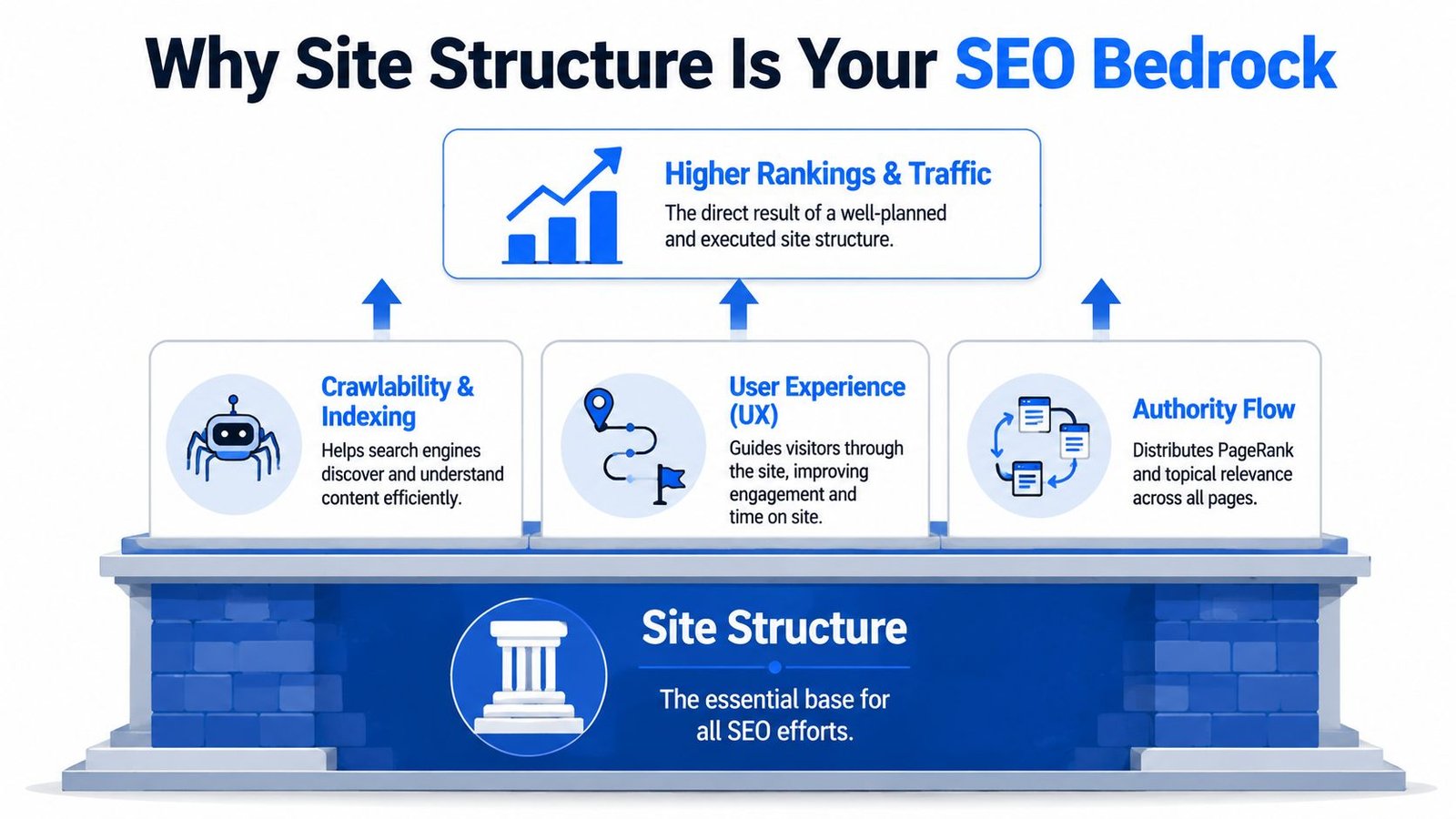
Site structure for SEO is the framework that tells search engines what your site is about, which pages matter most, and how those pages relate to each other. It also tells users whether they can move through the site without friction. If that framework is messy, everything built on top of it underperforms.
Google's own guidance makes the point clearly. Its SEO Starter Guide says site structure helps Google discover content through links and sitemaps, and it recommends descriptive URLs, unique titles, and organized headings. It also supports the practical benchmark of keeping important pages within 3 clicks of the homepage, not as a ranking formula but as a widely used architecture standard. If you want a broader grounding in how this fits into SEO as a whole, this overview of search engine optimization is a useful companion.
Structure affects discovery, understanding, and trust
Think of a well-run library. Books are grouped by topic, shelves follow a logic, and related materials sit near each other. A visitor can move from broad subject to specific title without guessing. Search engines interpret a strong website the same way.
When pages are grouped by topic, linked with intent, and placed in clear directories, crawlers don't have to infer as much. They can see that a parent category supports a cluster of related child pages. They can understand that an integration page belongs with integrations, not hidden in a generic resources folder. That makes indexing cleaner and topical signals stronger.
For users, the benefits are even more immediate:
- Navigation becomes predictable. People can move from broad intent to specific solutions without backtracking.
- Commercial pages get reached faster. Feature, pricing-adjacent, category, and product pages aren't buried behind blog clutter.
- Page relationships make sense. A buyer sees how use cases, integrations, and product details connect.
Practical rule: If a human needs to think too hard about where a page lives, Google probably has to work too hard to interpret it too.
Why weak architecture drags down strong content
A lot of teams try to solve structural problems with more content. That rarely works. Publishing more pages into a weak hierarchy usually creates more confusion, not more visibility.
The common failure pattern looks like this:
| Problem | What happens |
|---|---|
| Pages are scattered across inconsistent folders | Topic relationships weaken |
| Navigation favors legacy sections | Priority pages receive less internal support |
| Important URLs sit too deep | Discovery and link flow slow down |
| Similar pages exist in multiple paths | Relevance signals get diluted |
This matters most on expanding SaaS and eCommerce sites. A small brochure site can survive some architectural sloppiness. A catalog with filters, variants, and supporting content usually can't.
Strong site structure for SEO turns the site into a system. Category pages support subcategories. Pillar pages support use-case pages. Documentation supports features. The result isn't just better crawlability. It's a site where every page has a job and every link reinforces that job.
Auditing Your Current Information Architecture
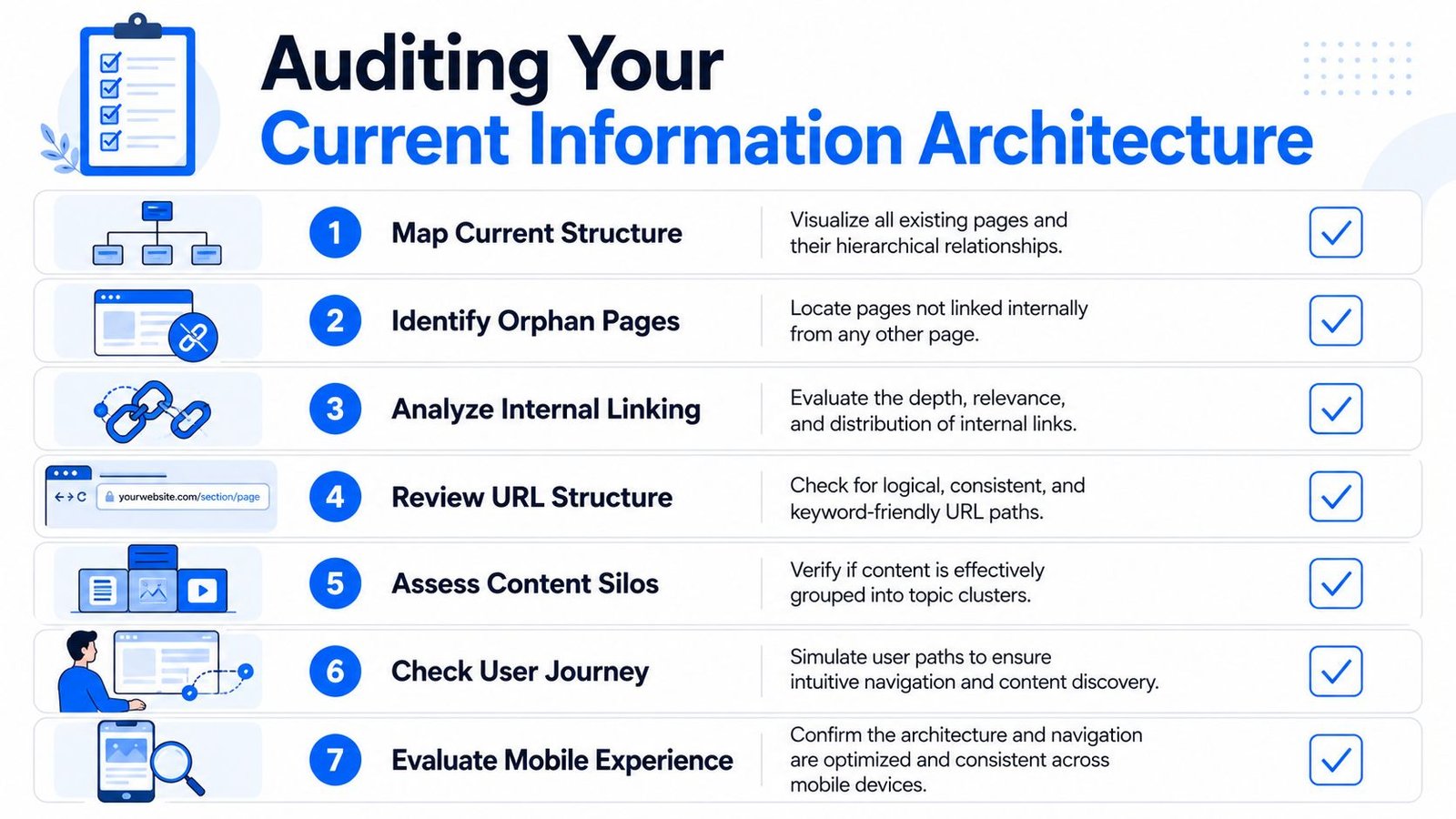
Most architecture projects start with a false assumption. Teams think they know their structure because they know their navigation. They don't. Navigation is only the visible layer. The actual architecture includes hidden orphan pages, outdated folders, redirected legacy sections, filtered URLs, and templates that create pages no one reviews.
The first step is to crawl the site and build an inventory. Tools like Screaming Frog, Ahrefs Site Audit, and Sitebulb make this much easier because they show page depth, internal links, status codes, canonicals, and indexability in one place. You're not hunting for abstract “SEO issues.” You're diagnosing where the site stops behaving like a coherent system.
Start with a crawl and a page inventory
Pull a full crawl, then segment pages by role. For SaaS, that usually means homepage, features, solutions, integrations, comparison pages, blog, docs, legal, and account areas. For eCommerce, split pages into categories, subcategories, products, filter URLs, collections, editorial content, and utility pages.
Then compare that crawl to what the business thinks exists. This gap is usually where architecture projects become urgent.
Use a simple worksheet with columns like:
- Page type
- Current URL
- Indexable or not
- Click depth
- Internal links in
- Canonical target
- Recommended action
A checklist can help keep the process consistent. This website auditing checklist is a practical reference when you need to review structure methodically instead of chasing issues one by one.
Find the structural failures that matter
A common benchmark for large-scale architecture is keeping priority pages within 3 clicks from the homepage. SEO practitioners also call out orphan pages, weak internal linking, and key pages buried beyond that depth as primary failure points, as outlined in Team Lewis on SEO site structure.
That benchmark is useful during an audit because it gives you a quick way to spot friction. But don't stop at depth alone. Some pages are deep for good reasons. The core issue is whether the site's most important pages are discoverable and supported.
Look for these patterns:
- Orphan pages with no internal links from navigational or contextual sources.
- Priority URLs buried too deep relative to their business value.
- Broken internal links pointing into old sections or removed content.
- Inconsistent URL patterns where similar page types live in different folders.
- Duplicate pathways that let users and crawlers reach near-identical content through multiple routes.
Orphan pages are often a symptom of process failure, not just a linking failure. Someone published the page, but no one assigned it a place in the system.
Turn the audit into a working map
Once the issues are visible, reduce the site to a diagram. Don't start with pixel-perfect wireframes. Start with page relationships.
For each major section, identify:
- The parent page that represents the broad topic or commercial area.
- The child pages that should inherit relevance from that parent.
- The cross-links that should exist between related pages.
- The pages that should be consolidated, redirected, or excluded from indexation.
This map becomes the basis for the redesign. It also helps get buy-in from product, engineering, and content teams because they can see the trade-offs clearly. A site audit that ends in a spreadsheet rarely changes architecture. A site audit that ends in a map usually does.
Designing Your SEO-First Hierarchy and URLs
A strong hierarchy starts with business intent, not folder aesthetics. The question isn't “what looks neat in the menu?” It's “how should this site explain itself to a buyer and to a crawler?”
Google-aligned guidance and industry practice point in the same direction. A technically strong architecture groups related pages in the same directory or subfolder, uses short descriptive URLs, and makes relationships easy to interpret. Impression's website architecture guidance captures this well. Clean subfolder organization strengthens topical signals and crawlability.

Build from parent topics down to transactional pages
The best architecture usually moves from broad parent themes to more specific commercial or informational pages. That sounds obvious, but many sites reverse it. They create isolated landing pages first, then try to stitch them together later.
For SaaS, a practical hierarchy often looks like this:
| Level | Example |
|---|---|
| Parent | /features/ |
| Child | /features/workflows/ |
| Child | /features/reporting/ |
| Parent | /solutions/ |
| Child | /solutions/marketing-teams/ |
| Child | /solutions/operations/ |
| Parent | /integrations/ |
| Child | /integrations/salesforce/ |
| Child | /integrations/slack/ |
This works because each folder signals a distinct content type and intent. A user looking for a capability goes to features. A buyer validating fit goes to solutions. A technical evaluator goes to integrations. Those distinctions help both navigation and topical clarity.
For eCommerce, the model is usually more literal:
- Category such as
/furniture/ - Subcategory such as
/furniture/office-chairs/ - Product page such as
/furniture/office-chairs/ergonomic-mesh-chair/
That path matches how people shop. It also reduces the risk of scattered product URLs living outside their category context.
Translate hierarchy into durable URL patterns
Good URLs do three things. They describe the page, reflect its place in the hierarchy, and stay stable as the site grows.
Bad URL patterns usually fail because they mirror internal systems instead of customer logic. You see parameters in places that should be clean, generic folders like /pages/, or naming conventions that change every quarter because teams can't agree on taxonomy.
Use these rules:
- Keep folders meaningful.
/integrations/hubspot/is clearer than/platform/connectors/hubspot-app/. - Avoid unnecessary depth. More folders don't equal more relevance.
- Use consistent naming. If one solution page lives under
/solutions/, all solution pages should. - Reserve parameters for controlled cases. Don't let them define canonical page structure unless there's a real reason.
The best URL structure usually looks boring. That's a good sign. Predictability scales better than cleverness.
What good hierarchy looks like in SaaS and eCommerce
SaaS sites often need to balance multiple user journeys on the same domain. A prospect may enter through a comparison page, move to a use case page, then validate with docs or integrations. That means hierarchy can't be too rigid. It needs clear parent sections, plus contextual links across them.
eCommerce has a different pressure. Category and subcategory paths need to stay clean while the catalog expands through seasonal collections, variants, and filter combinations. The hierarchy should handle growth without forcing products into conflicting paths.
What doesn't work in either model is the same old pattern: a flat pile of landing pages, a blog detached from commercial pages, and URLs that tell you nothing about role or relationship.
Handling Advanced Architecture Challenges
Most site structure advice often breaks down. Generic guides tell you to keep things flat, use clear categories, and avoid deep pages. Fine. That helps on simple sites. It doesn't solve the architecture problems that appear when a SaaS platform has dozens of integration permutations or when an eCommerce catalog generates endless filtered URLs.
A more nuanced view matters here. Large SaaS and eCommerce sites don't fail because their hierarchy is imperfect. They fail because filters, pagination, and programmatic expansion create too many crawl paths with too little business value. Altitude Marketing's discussion of site structure for larger catalogs gets at this directly. Clean hierarchy is necessary, but internal linking rules and canonicalization determine whether search engines reach the pages that matter.

Faceted navigation needs rules, not hope
Faceted navigation is useful for users and dangerous for SEO when unmanaged. Every filter combination can create a new URL path. On a large store, that can turn one category into hundreds or thousands of near-duplicate pages.
The right approach is selective.
Allow indexing when a filtered page represents a stable, valuable search destination with unique demand and a clear role in the site. Canonicalize back to the main category when the filter creates a thin variation that doesn't deserve its own visibility. Keep low-value combinations from becoming crawl traps through controlled crawl management and internal linking discipline.
A practical decision model looks like this:
| Filter page type | Recommended treatment |
|---|---|
| High-intent, stable category variant | Consider indexable if it has distinct value |
| Sort orders and session-like variants | Don't let these become canonical targets |
| Thin combinations with little standalone purpose | Canonicalize to the main relevant category |
| Endless facet combinations | Limit crawl access and internal exposure |
The mistake is applying one rule to every facet. “Index all filters” creates bloat. “Block all filters” can hide useful category variants. You need a policy tied to search intent and site economics.
Pagination still needs clean signals
Pagination isn't a relic. It still matters on category pages, article archives, and large knowledge bases. What has changed is the mindset.
Don't treat paginated pages as if they must all compete independently. Treat them as part of a series that supports product discovery or content access. Each page should have a self-referencing canonical when appropriate, clear internal links between pages in the series, and a pathway back to the main category or archive. That keeps the sequence understandable without asking crawlers to guess what belongs where.
If your paginated series is the only route to deeper products or articles, make sure those later pages aren't isolated from the rest of the site. Supplemental links from subcategories, related blocks, or curated hubs often fix this.
Programmatic growth can help or hurt
Programmatic SEO and template-driven publishing are common in SaaS. Teams build pages for industries, locations, use cases, competitors, or integrations because the framework is scalable. The danger isn't scale itself. The danger is creating hundreds of pages with weak differentiation and no architectural support.
Use a few tests before adding a new template family:
- Does the page type fit an existing parent section?
- Can internal links connect it to adjacent pages naturally?
- Will canonical rules stay clear as the set expands?
- Can the page justify indexation on its own merits?
A template is not a strategy. If the architecture can't absorb a page type cleanly, publishing more of it usually makes the site worse.
Reinforcing Structure with Linking and Technical Signals
A clean hierarchy on a diagram means very little if the live site doesn't reinforce it. Search engines infer structure from links, HTML, navigation patterns, breadcrumbs, and crawl signals. If those inputs conflict, the architecture weakens fast.
That's why the flat-versus-deep debate is often too simplistic. The more useful question is whether the site is logical, efficient, and accessible. Siteimprove's perspective on site structure, accessibility, and rankings highlights this well. Discoverability depends on breadcrumbs, semantic HTML, and scalable internal linking patterns, not only raw depth. To understand why this matters for authority distribution, it helps to review how link equity works across a website.
Internal links should reflect page roles
Not all internal links do the same job.
Navigational links establish major sections. Contextual links connect related ideas and pass relevance between pages with shared intent. Breadcrumbs define hierarchy. Footer links can support utility sections, but they're a poor substitute for thoughtful linking higher up in the experience.
A healthy pattern usually includes:
- Section-level navigation that exposes major parent pages clearly.
- Contextual links within body copy from high-authority pages to supporting child pages.
- Reciprocal links where useful so child pages can point back to their parent hub or adjacent siblings.
- Breadcrumb trails that match the actual hierarchy, not a forced one.
For SaaS, this might mean feature pages linking to relevant integrations and solution pages. For eCommerce, category pages may link into subcategories, while product pages return signals through breadcrumbs and related-item modules.
Breadcrumbs, sitemaps, and crawl guidance
XML sitemaps should support the architecture, not compensate for bad internal linking. Keep them clean. Include canonical URLs that you want crawled and indexed. Leave out thin, duplicate, or low-priority utility pages.
Robots.txt also matters, but mainly as a control layer. Use it to guide crawlers away from sections that don't deserve attention. Don't use it as a bandage for a site that creates unnecessary URL variations in the first place.
A useful technical review asks:
- Do breadcrumbs match the intended hierarchy?
- Does the sitemap contain the pages the business wants visible?
- Are crawlable low-value paths being generated unnecessarily?
- Do template modules reinforce parent-child relationships consistently?
Logical beats artificially flat
A site can be relatively deep and still perform well if the relationships are clear and the internal links do real work. A site can also be “flat” on paper and still confuse both users and crawlers if everything sits at the same level with no semantic grouping.
That's why forcing every page close to the homepage can backfire. It often creates bloated menus, weak category logic, and generic hubs that don't help buyers choose the next step.
The better architecture usually feels simple because each page has an obvious place, obvious parent, and obvious next click.
Managing Migration and Measuring Success
Changing site structure is one of the highest-risk SEO projects a team can run. It touches URLs, navigation, templates, canonicals, sitemaps, and internal links at the same time. A good plan protects what already works while making the new architecture visible quickly.
Protect equity during launch
URL mapping is an essential task. Every old URL that has value should redirect to the most relevant new equivalent. Keep the mapping as close to page intent as possible. Don't dump retired sections onto the homepage or broad category pages just because it's easier for engineering.
A pre-launch checklist should include:
- Redirect mapping completed for all moved or consolidated URLs
- Canonical tags reviewed on templates and key page types
- Navigation updated to reflect the new hierarchy
- Breadcrumbs aligned with the final folder structure
- XML sitemap regenerated with canonical destination URLs
- Internal links refreshed so they point to final pages, not redirects
After launch, crawl the site again. Screaming Frog is useful here because it will reveal redirect chains, broken links, orphaned new pages, and canonicals that still point to retired URLs. Search Console should also be monitored closely for indexing changes, coverage issues, and crawl behavior.
Launch day doesn't end the project. It starts the validation period.
Measure whether the new structure is working
The best post-launch reporting focuses on section-level outcomes, not vanity metrics.
For SaaS, watch whether feature pages, solutions, integrations, and docs become easier to discover and index. For eCommerce, monitor category and subcategory visibility, product discovery paths, and whether crawlers spend less time in low-value parameter spaces.
Use a practical scorecard:
| Area | What to review |
|---|---|
| Crawl behavior | Whether key sections are being reached and revisited efficiently |
| Indexation | Whether canonical commercial pages are indexed as intended |
| Internal link health | Whether priority pages receive stronger internal support |
| Section performance | Whether core site areas gain visibility and traffic qualitatively |
| Migration hygiene | Whether redirects, canonicals, and breadcrumbs remain consistent |
A successful migration rarely means every metric improves at once. What you want first is stability, then cleaner indexing, then stronger performance in the sections the new architecture was designed to support. If those signals don't appear, the issue is usually one of three things: redirect gaps, weak internal reinforcement, or page types that were added without a clear architectural role.
If your SaaS or eCommerce site has outgrown its current architecture, SaasSky can help you rebuild it with a structure that supports crawl efficiency, clearer internal linking, and scalable growth. Their team works with brands that need practical SEO strategy, not generic templates, especially when migrations, category expansion, and programmatic page growth are on the table.